
Unit-3: Python interaction with SQLite:

Python interaction with SQLite:
- 3.1 Module: Concepts of module and Using modules in
- python.3.1.1 Setting PYTHONPATH, Concepts of Namespace and Scope
- 3.1.2 Concepts of Packages in python
- 3.2 Importing sqlite3 module
- 3.2.1 connect () and execute() methods.
- 3.2.2 Single row and multi-row fetch ( fetchone(), fetchall())
- 3.2.3 Select, Insert, update, delete using execute () method.
- 3.2.4 commit () method.
NOTES
✅ What is a Module in Python?
A module in Python is simply a file containing Python code — it could include functions, variables, and classes. Modules help in organizing code logically and reusing it across different programs.
File extension of a module:
.pyYou can create your own module or use Python’s built-in modules.
📌 Benefits of Using Modules:
Avoids repetition of code.
Makes code more organized and manageable.
Promotes code reuse.
Helps in debugging by isolating functionality
✅ Types of Modules
| Type | Description |
|---|---|
| Built-in Modules | Already available in Python, like math, random, sqlite3 |
| User-defined Modules | Created by the user to suit specific project needs |
| External Modules | Provided by third parties (like pandas, numpy), and need to be installed using pip |
✅ Importing Modules
There are several ways to import a module:
import math
print(math.sqrt(16)) # Output: 4.0
from math import sqrt
print(sqrt(25)) # Output: 5.0
import sqlite3 as db
conn = db.connect(‘test.db’) # SQLite module with alias
✅ Using Modules in Python (SQLite Example)
Python provides a built-in module called sqlite3 that allows interaction with SQLite databases. This module lets you create, read, update, and delete (CRUD) data from a database file.
🔹 Steps to Use sqlite3 Module:
import sqlite3 # Step 1: Import the module
# Step 2: Connect to a database (or create if it doesn’t exist)
conn = sqlite3.connect(‘student.db’)
# Step 3: Create a cursor object
cur = conn.cursor()
# Step 4: Write and execute SQL commands
cur.execute(”’
CREATE TABLE IF NOT EXISTS students (
id INTEGER PRIMARY KEY,
name TEXT,
marks INTEGER
)
”’)
# Step 5: Insert data
cur.execute(“INSERT INTO students (name, marks) VALUES (?, ?)”, (‘Alice’, 90))
# Step 6: Save changes
conn.commit()
# Step 7: Retrieve data
cur.execute(“SELECT * FROM students”)
rows = cur.fetchall()
for row in rows:
print(row)
# Step 8: Close the connection
conn.close()
✅ Key Functions in sqlite3 Module
| Function | Purpose |
|---|---|
connect() |
Connects to the database |
cursor() |
Creates a cursor for executing SQL |
execute() |
Executes an SQL command |
commit() |
Saves changes to the database |
fetchall() |
Retrieves all records from a query |
close() |
Closes the connection to the database |
✅ 3.1.1 Setting PYTHONPATH, Concepts of Namespace and Scope
✅ What is PYTHONPATH?
PYTHONPATH is an environment variable used by Python to locate the directories where your Python modules and packages are stored. When you import a module, Python searches in:
The current working directory,
Standard library folders,
Paths listed in
PYTHONPATH.
✅ Why Set PYTHONPATH?
To import user-defined modules stored in different directories.
To customize your development environment.
Useful in large projects where modules are spread across multiple folders.
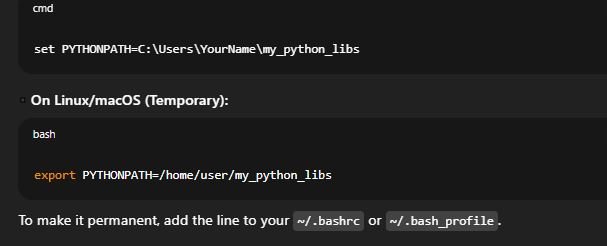
✅ How to Set PYTHONPATH:
◾ On Windows:
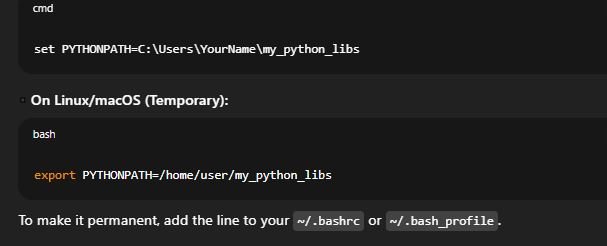
To make it permanent, add the line to your ~/.bashrc or ~/.bash_profile.
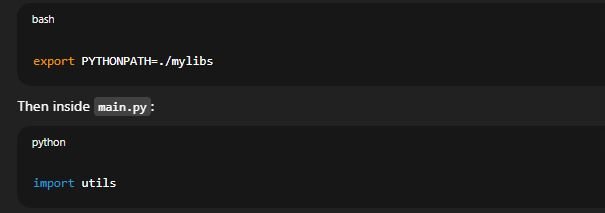
✅ Example Use:
Suppose you have this structure:
If you’re running main.py but want to import utils, you can set:
🔹 2. Concept of Namespace in Python
✅ What is a Namespace?
A namespace is like a naming system that ensures names are unique and can be used without conflicts. It acts like a container that holds names (variables, functions, objects) and their references.
✅ Types of Namespaces:
| Namespace Type | Description |
|---|---|
| Built-in | Automatically created when Python starts (e.g., print(), len()). |
| Global | For variables defined at the top level of a script or module. |
| Local | For variables defined inside functions or methods. |
| Enclosing | Refers to the namespaces of enclosing functions in case of nested functions. |
x = 10 # Global namespace
def func():
y = 5 # Local namespace
print(x) # Accesses global x
func()
🔹 3. Concept of Scope in Python
✅ What is Scope?
Scope defines the visibility and lifetime of a variable. In simple words, it determines where in your code a variable is accessible.
✅ Scope Levels (LEGB Rule):
✅ Example of Scope:
| Scope | Description |
|---|---|
| L – Local | Names inside the current function. |
| E – Enclosing | Names in enclosing functions (for nested functions). |
| G – Global | Names in the top-level script/module. |
| B – Built-in | Predefined names in Python (like str, int). |
x = 100 # Global
def outer():
y = 50 # Enclosing
def inner():
z = 10 # Local
print(x, y, z)
inner()
outer()
✅ 3.1.2 Concepts of Packages in Python
🔹 What is a Package in Python?
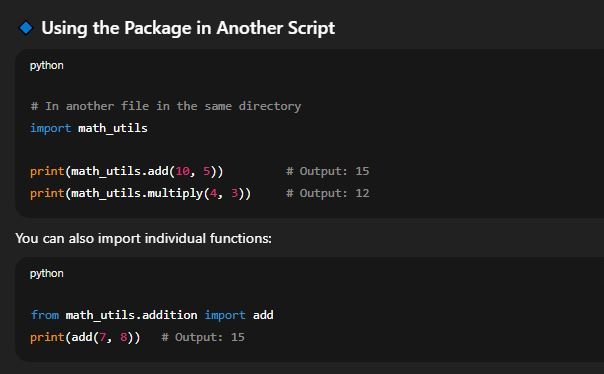
A package in Python is a way of organizing related modules into a single directory. It is essentially a folder containing multiple Python files (modules) and a special __init__.py file that marks the directory as a package.
Packages are used to:
Group related code together
Make large projects modular
Enable code reuse and easy maintenance
✅ Difference Between Module and Package
| Feature | Module | Package |
|---|---|---|
| Meaning | A single .py file |
A directory with modules and __init__.py |
| Usage | Used to reuse code | Used to organize and structure large applications |
| Example | math, os |
numpy, pandas |
__init__.py: Initializes the package. It can be empty or contain initialization code.module1.pyandmodule2.py: Regular Python files containing functions, classes, or variables.sub_package: A package inside a package (nested package).
🔹 Creating a Simple Package
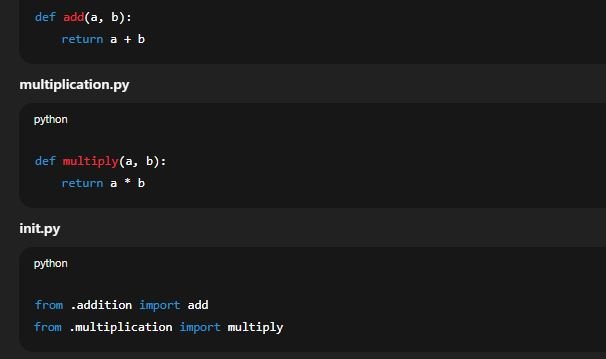
Suppose you want to create a package called math_utils with basic math operations.
Step 1: Create Folder and Files
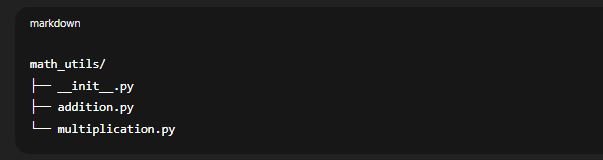
Step 2: Define Functions in Modules
addition.py
✅ Built-in & External Python Packages
Built-in packages: Python includes many built-in packages like
email,http, andxml.External packages: Packages like
numpy,pandas, andflaskare developed by the community and installed using pip:

🔹 Advantages of Using Packages
Keeps project code well-organized and modular
Easier to manage large applications
Avoids name clashes between modules
Encourages reusable code
✅ 3.2 Python Interaction with SQLite – sqlite3 Module
🔹 3.2. Importing sqlite3 Module
Python provides a built-in module called sqlite3 to work with SQLite databases. This module allows you to create, read, update, and delete data stored in .db files using SQL commands.
✅ Importing the Module:

This gives you access to all the SQLite functionalities like connecting to a database, executing SQL queries, and handling results.
🔹 3.2.1 connect() and execute() Methods
✅ connect() Method:
Used to establish a connection to an SQLite database.

If
student.dbdoes not exist, it will be created.Returns a connection object.
✅ execute() Method:
Used to run SQL commands like CREATE, INSERT, SELECT, UPDATE, DELETE, etc.

🔹 3.2.2 Single Row and Multi-Row Fetch
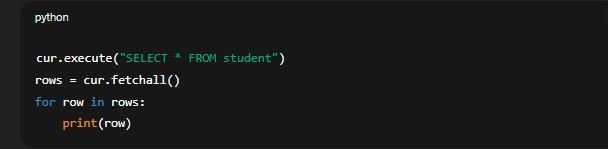
Once a SELECT query is executed, you can retrieve data using:
✅ fetchone():
Retrieves only the first row of the result set.

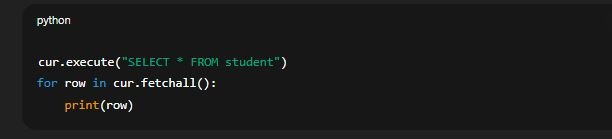
✅ fetchall():
Retrieves all the rows returned by the query as a list of tuples.
🔹 3.2.3 Using execute() for SELECT, INSERT, UPDATE, DELETE
✅ 1. INSERT data:

✅ 2. SELECT data:
✅ 3. UPDATE data:

✅ 4. DELETE data:

🔹 3.2.4 commit() Method
After performing INSERT, UPDATE, or DELETE operations, the changes are not saved until you commit them.
✅ Why commit() is needed:
It confirms changes made to the database.
If not called, changes may be lost after closing the connection.
✅ Syntax:
