
Unit-4: Python Interaction with text and CSV

Unit-4: Python Interaction with text and CSV

  • 4.1 File handling ( text and CSV files) using CSV module :
    • 4.1.1 CSV module , File modes: Read , write, append
  • 4.2 Important Classes and Functions of CSV modules:
    • 4.2.1 Open(), reader(), writer(), writerows(), DictReader(),
      DictWriter()
  • 4.3 Dataframe Handling using Panda and Numpy:
    • 4.3.1 csv and excel file extract and write using Dataframe
    • 4.3.2 Extracting specific attributes and rows from dataframe.
    • 4.3.3 Central Tendency measures :
    • 4.3.3.1 mean, median, mode, variance, Standard Deviation
    • 4.3.4 Dataframe functions: head, tail, loc, iloc, value, to_numpy(),
      describe()

NOTES

🔹 What is File Handling?

File handling in Python allows us to create, read, write, and modify files stored on disk. It is a crucial part of most applications for storing and retrieving data.

There are two common file formats for structured data:

  • Text Files (.txt)

  • CSV Files (.csv – Comma-Separated Values)

🔹 Why CSV Files?

  • CSV files store tabular data (rows and columns) in plain text.

  • Each line represents a row, and values are separated by commas (or other delimiters).

  • Widely used in data import/export in databases, Excel, spreadsheets, etc.

🔹 Python’s csv Module

Python provides a built-in csv module to read from and write to CSV files easily.

To use it:

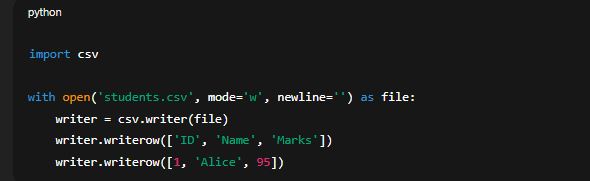
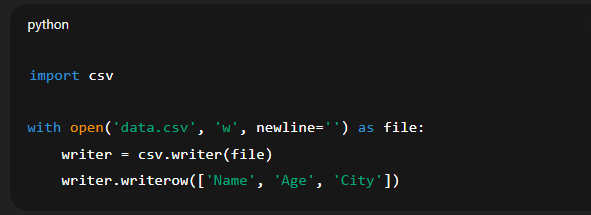
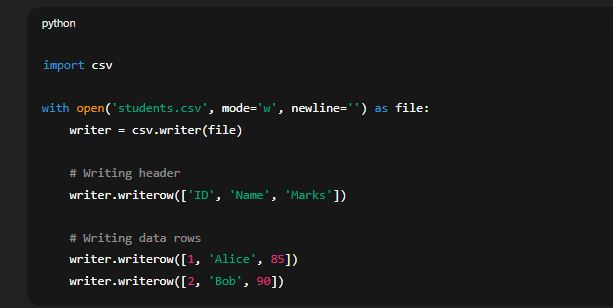
✅ 1. Writing to a CSV File

🟢 Syntax:

🔹 Explanation:

  • mode='w': Opens the file in write mode.

  • newline='': Prevents adding extra blank lines on Windows.

  • writerow(): Writes a single row (list of values).

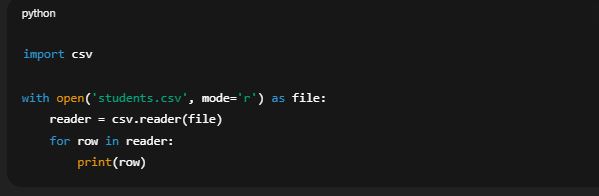
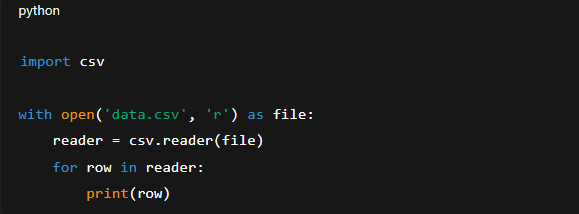
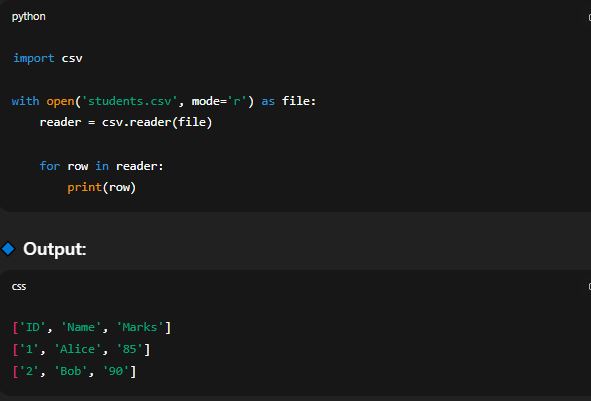
✅ 2. Reading from a CSV File

🟢 Syntax:

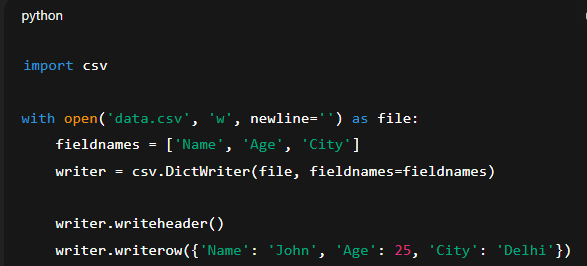
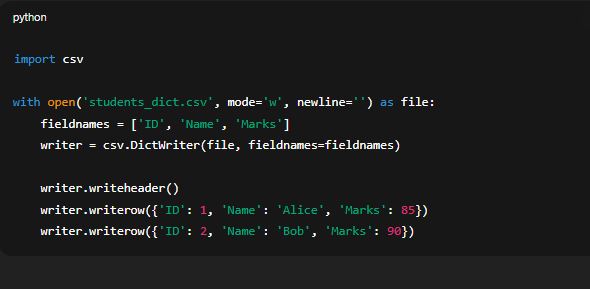
✅ 3. Writing CSV with Dictionary (DictWriter)

You can also write CSV rows using a dictionary format.

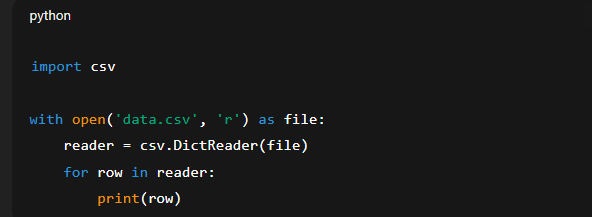
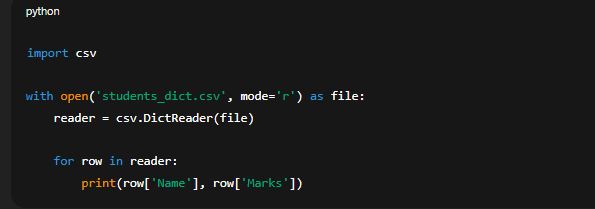
✅ 4. Reading CSV with Dictionary (DictReader)
🔹 File Modes Summary:

Mode Description
'r' Read
'w' Write (overwrite)
'a' Append
'r+' Read and write

🔹 Handling Text Files (Brief Overview)

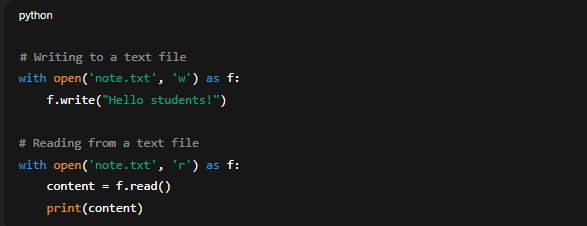
Although csv module is used for CSV files, Python also handles plain text files using built-in functions.

✅ Real-life Applications:

  • Storing student or employee records.

  • Reading/writing inventory or billing data.

  • Data exchange between applications and Excel.

✅ 4.1.1 CSV Module and File Modes: Read, Write, Append

🔹 What is the csv Module in Python?

The csv module is a built-in Python module used for handling CSV (Comma-Separated Values) files. It allows you to:

  • Read data from CSV files

  • Write data to CSV files

  • Handle data as rows and columns

  • Work with both lists and dictionaries

CSV files are commonly used for storing structured data like tables, spreadsheets, and database records in a simple text format.

✅ Why Use the csv Module?

  • Makes it easy to read and write tabular data.

  • Supports different delimiters (not just commas).

  • Works with both row-based (writer, reader) and column-based (DictWriter, DictReader) formats.

Key Functions of csv Module

Function Purpose
csv.reader() Read data from a CSV file (line by line)
csv.writer() Write rows to a CSV file
csv.DictReader() Read data into a dictionary

✅ File Modes in Python

To use a CSV file, it must first be opened using the built-in open() function. The mode you choose defines how the file will be used.

🔹 r Mode – Read Mode

  • Opens the file for reading only.

  • File must exist already.

  • Used with csv.reader() or csv.DictReader().

Example:

🔹 w Mode – Write Mode

  • Opens the file for writing.

  • Overwrites the file if it exists.

  • Creates a new file if it doesn’t exist.

  • Used with csv.writer() or csv.DictWriter().

Example:

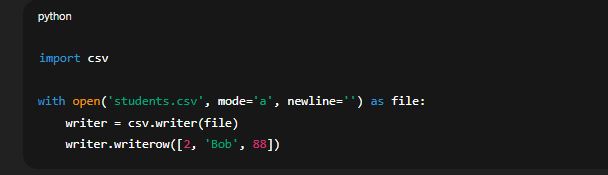
🔹 a Mode – Append Mode

  • Opens the file to add new data at the end.

  • Preserves existing data in the file.

  • Useful for logging or adding new records without deleting old ones.

Example:

Mode Action File Must Exist Overwrites Adds New Data
'r' Read Yes No No
'w' Write No Yes No
'a' Append No No Yes

✅ Good Practices While Using CSV and File Modes

  • Use with open(...) syntax to automatically close files.

  • Use newline='' to avoid extra blank lines in Windows.

  • Always use the correct mode to avoid accidental data loss.

✅ Real-world Uses of csv Module

  • Storing marks or attendance of students.

  • Exporting/importing inventory from business systems.

  • Logging user data or activities in plain files.

  • Preparing datasets for analysis in Excel or Python (Pandas).

4.2 Important Classes and Functions of CSV Modules

The csv module in Python is a built-in library used for reading from and writing to CSV (Comma-Separated Values) files. It provides tools to handle tabular data easily, making it a common choice for working with spreadsheets or database-style text files.

🔹 4.2.1 Important Functions and Classes

4.2.1 open() Function

🔹 Purpose:

The open() function is used to open a file. It allows reading from or writing to the file depending on the mode specified.

🔹 Syntax:

🔸 Example:

Mode Meaning Usage
'r' Read Opens file for reading (default)
'w' Write Opens file for writing (creates new or overwrites)
'a' Append Opens file for adding new data
'r+' Read and Write Opens file for both operations
✅ Note: Always close the file using file.close() or use with open(...) to automatically close it.

csv.reader()

🔹 Purpose:

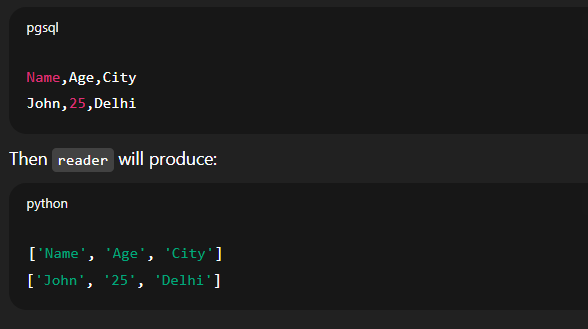
The reader() function reads data from a CSV file and returns each line as a list of values.

🔹 Syntax:

🔹 How it works:

Each row from the CSV file becomes a Python list. All rows are iterated line by line.

🔹 Output Example:

If data.csv contains:

csv.writer()

🔹 Purpose:

The writer() function is used to write data to a CSV file.

🔹 Syntax:

🔹 Features:

  • Converts lists into rows.

  • Each element of the list becomes a field in the CSV file.

🔹 Example Output:

File data.csv will now contain:

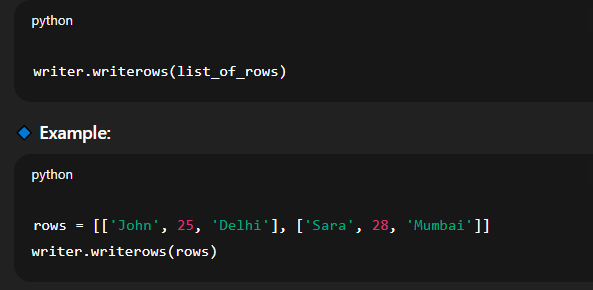
writerows()

🔹 Purpose:

writerows() is used to write multiple rows (a list of lists) to the CSV file in one go.

🔹 Syntax:


csv.DictReader()

🔹 Purpose:

DictReader() reads CSV data and maps each row into a dictionary using the first row as field names.

🔹 Syntax:

🔹 Advantages:

  • Access values using column headers like row['Name']

  • Automatically handles missing or extra columns

csv.DictWriter()

🔹 Purpose:

DictWriter() allows writing dictionaries to a CSV file where keys represent the column headers.

🔹 Syntax:

4.3 DataFrame Handling using Pandas and NumPy

DataFrame handling is a key skill in data analysis using Python. The two most popular libraries used for this purpose are Pandas and NumPy.

🔷 Introduction to Pandas and NumPy

  • Pandas is a powerful open-source library built on top of NumPy. It provides high-level data structures and tools for efficient data manipulation and analysis.

  • NumPy stands for Numerical Python. It provides support for large multi-dimensional arrays and matrices and includes functions for mathematical operations.

Together, these libraries are used to process and analyze structured data like CSV and Excel files in an efficient and readable manner.

✅ 4.3.1 CSV and Excel File Extract and Write Using DataFrame

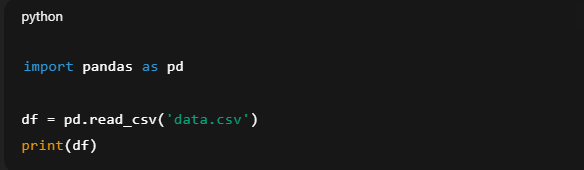
📘 Reading CSV Files into DataFrame

To read a .csv file:

  • This loads the contents of the file into a DataFrame.

  • Each row becomes a record, and each column becomes a field.

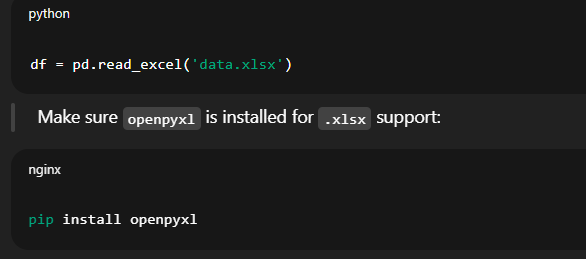
📘 Reading Excel Files into DataFrame


📗 Writing DataFrame to CSV

 
  • Saves the DataFrame into a new or existing CSV file.

  • index=False avoids writing the index as a separate column.

📗 Writing DataFrame to Excel

  • Useful for storing clean or processed data in Excel format.

✅ 4.3.2 Extracting Specific Attributes and Rows from DataFrame

Pandas makes it easy to extract required data from a large dataset.

🔹 Extracting Specific Columns

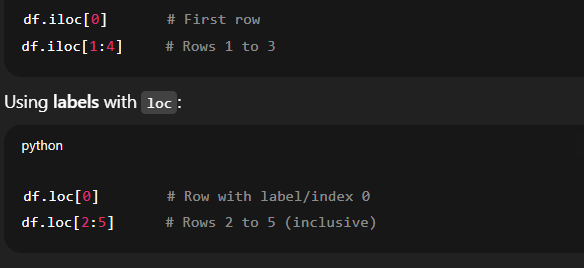
🔹 Extracting Specific Rows

Using index numbers with iloc:

🔹 Conditional Row Extraction

  • Returns only rows where Age is greater than 25.

✅ 4.3.3 Central Tendency Measures

Central tendency refers to the typical or average values in a dataset.

🔹 Mean

Average of values:

🔹 Median

Middle value in sorted order:

🔹 Mode

Most frequent value:

🔹 Variance

Measure of data spread from the mean:


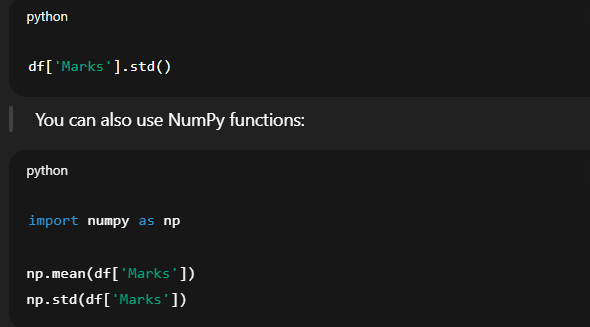
🔹 Standard Deviation

Measure of consistency or deviation from the mean:

✅ 4.3.4 DataFrame Functions

These are some commonly used Pandas functions that help you inspect and manipulate DataFrames efficiently:

Function Description
head() Returns first 5 rows (or custom count)
tail() Returns last 5 rows
loc[] Selects data using row/column labels
iloc[] Selects data using row/column positions
values Returns raw values as a NumPy array
to_numpy() Converts DataFrame into NumPy array
describe() Shows summary statistics for numerical columns

📌 Examples:

➤ head() and tail()

➤ loc[]

➤ iloc[]

➤ values / to_numpy()

➤ describe()

Gives count, mean, std, min, 25%, 50%, 75%, max for each numeric column.

Leave a Reply

Your email address will not be published. Required fields are marked *

sign up!

We’ll send you the hottest deals straight to your inbox so you’re always in on the best-kept software secrets.