Your college wants to connect all classrooms, labs, library, and admin office into one secure network. Draw the most suitable topology, explain why you chose it, and discuss its advantages and disadvantages if the network grows in the future.
SOLUTION....
The most suitable topology for connecting classrooms, labs, library, and the admin office into one secure network is the Star Topology.
In this design, all the different sections of the college (classrooms, labs, library, admin office) are connected to a central networking device (like a switch or router). Each individual node (computer, printer, or other device) has its own dedicated cable that links it directly to the central hub.
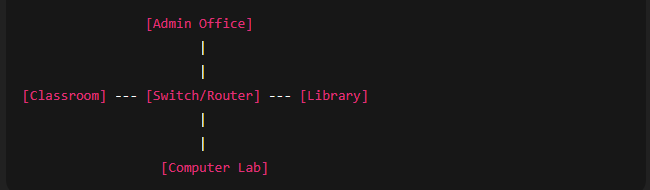
Why Choose Star Topology?
Centralized Control: Since all the connections go through a central hub or switch, managing and monitoring the network becomes easy. This is very important for a college where security and proper allocation of resources matter.
High Performance: Each section gets a dedicated line to the hub, reducing data collisions and improving network speed. This is useful when labs or library systems handle large data transfers.
Easy Troubleshooting: If a problem occurs in one classroom’s connection, only that link will be affected. The rest of the network continues working normally.
Flexibility: Adding a new computer, classroom, or lab can be done easily by connecting it to the hub without disturbing existing connections.
Advantages of Star Topology
Simple to Install and Manage: The layout is straightforward, making it easy for technicians to set up and maintain.
Fault Isolation: When a cable or device fails, only that part is affected, making fault detection and repair quick.
Scalability: It allows the college to expand easily. New classrooms or labs can be added by connecting additional cables to the central hub.
Enhanced Security: Since all traffic flows through the hub, administrators can use security tools like firewalls and access controls more effectively.
Disadvantages of Star Topology
Dependency on Central Hub: If the central switch or router fails, the entire network stops functioning.
Cost of Installation: Each device needs its own cable to connect to the hub, which can increase installation costs as the network grows.
Hub Limitations: The hub has a limited number of ports. If the number of classrooms and labs grows very large, the college might need multiple switches or more advanced devices.
Impact of Future Growth
If the college adds more classrooms or labs, the star topology can handle it by connecting new devices to the hub. However, beyond a certain limit, the hub may get overloaded.
To manage this, the college can expand the star into a hierarchical star (using multiple switches connected together), which keeps the structure organized while supporting more users.
If the growth becomes very large (for example, a university-wide network), the college may need to shift toward a hybrid topology (a mix of star and tree topology) for better scalability.