Python has become one of the most widely used programming languages, especially in the field of data handling and analysis. One of the most important libraries that supports these tasks is Pandas. The word “Pandas” is derived from “Panel Data”, which refers to multidimensional structured datasets. It provides fast, flexible, and expressive tools for working with both labeled data (with row and column names) and relational data (tables).
What is Pandas?
Pandas is an open-source Python library used for data analysis and data manipulation.
It provides high-performance data structures like Series (1-dimensional) and DataFrame (2-dimensional).
It is built on top of NumPy, which makes it efficient for numerical operations.
Key Features of Pandas
Easy to Use: Simple commands for reading, writing, and analyzing data.
Data Handling: Supports different formats such as CSV, Excel, SQL, JSON, etc.
Label-Based Indexing: Access rows and columns using labels, not just numbers.
Data Cleaning: Helps handle missing or duplicate data easily.
Data Analysis: Provides tools for filtering, grouping, merging, reshaping, and aggregating data.
Integration: Works well with other libraries like Matplotlib (for visualization) and NumPy (for numerical tasks).
Using Pandas
After learning what Pandas is, the next step is to understand how to use it in Python programs. Pandas provides two main data structures – Series and DataFrame – which are used for handling and analyzing data effectively.
1. Importing Pandas
Before using Pandas, the library must be imported into the program:
Why Pandas?
When we work with small amounts of data, simple Python structures like lists, tuples, and dictionaries are enough. But in real life, data is usually large, structured, and complex. Handling such data with basic Python becomes slow and difficult. This is where Pandas plays an important role.
1. Easy Data Handling
Pandas provides Series (1D) and DataFrame (2D) structures that make data storage simple and organized.
Data looks like a table (rows and columns), which is easy to understand.
2. Fast and Efficient
Built on top of NumPy, Pandas is optimized for speed.
Operations on thousands of rows and columns are performed quickly.
3. Reading and Writing Data
Pandas supports different file formats like CSV, Excel, SQL, JSON, and text files.
It allows quick import and export of data with just one line of code.
4. Powerful Data Analysis
Filtering, sorting, grouping, and summarizing data is simple.
It allows statistical operations like mean, median, min, max, standard deviation directly.
5. Data Cleaning
Missing values can be easily filled, removed, or replaced.
Duplicate values can be identified and removed.
6. Label-Based Indexing
Unlike lists or arrays, Pandas allows label-based indexing.
You can access data using row names and column labels instead of just numbers.
7. Integration with Other Libraries
Works well with Matplotlib (for data visualization), NumPy (for numerical tasks), and scikit-learn (for machine learning).
8. Real-Life Applications
Used in business, research, banking, data science, AI, and machine learning.
Helps in analyzing large datasets, preparing reports, and making decisions.
Pandas Data Structures
Pandas provides special data structures that are designed for handling and analyzing data efficiently. These structures are more powerful and flexible than Python’s basic lists, tuples, or dictionaries. The two main data structures in Pandas are:
Series
DataFrame
1. Series
A Series is a one-dimensional labeled array.
It can hold data of any type – integers, floats, strings, or objects.
Each value in a Series has an associated index (label), which makes it easy to access elements.
Creating a Series
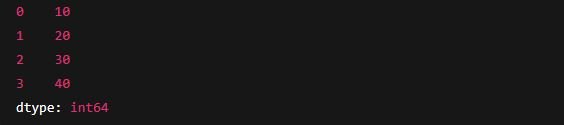
OUTPUT
Left column → index (0,1,2,3).
Right column → values (10,20,30,40).
Features of Series
Similar to a one-column table.
Index can be customized.
Can be created from lists, arrays, or dictionaries.
2. DataFrame
A DataFrame is a two-dimensional labeled data structure.
It looks like a table with rows and columns.
Each column in a DataFrame is a Series.
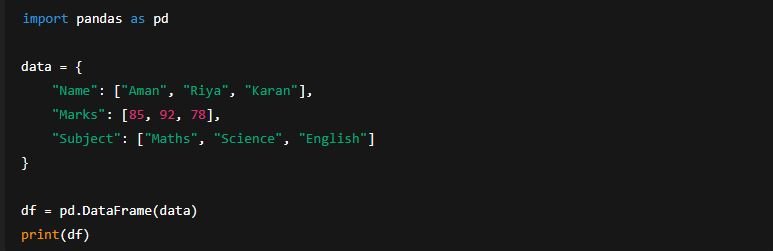
Creating a DataFrame
OUTPUT
Features of DataFrame
Stores data in rows and columns (tabular form).
Columns may hold different data types (string, int, float).
Easy to filter, modify, add, or remove data.
Can be created from dictionaries, lists, Series, or external files (CSV, Excel, etc.).
Comparison: Series vs DataFrame
Feature
Series (1D)
DataFrame (2D)
Dimension
One-dimensional
Two-dimensional
Structure
Like a single column
Like a full table (rows + cols)
Components
Index + values
Row index + column labels + data
Example
Student marks list
Student record table
Series Data Structure in Pandas
In Pandas, the Series is the most basic and important data structure. It is a one-dimensional labeled array that can hold data of any type such as integers, floats, strings, or even Python objects. Think of a Series as being similar to a single column of a spreadsheet or a single field in a database table.
Definition
A Series is a sequence of values (data) associated with a sequence of labels (index). It has two main components:
Index → Labels that identify each element (by default, numbers starting from 0).
Data → The actual values stored in the Series.
Characteristics of Series
One-Dimensional → A Series stores data in a single column-like structure.
Homogeneous → All elements in a Series are usually of the same data type.
Indexed → Each element is assigned a unique index. Index can be default (0,1,2,…) or user-defined (like names, IDs, etc.).
Size Immutable but Values Mutable → Once a Series is created, its size (number of elements) cannot change, but the values can be updated.
Data Type → A Series can store integers, floats, strings, or mixed data types.
Creating a Series Object in Pandas
A Series in Pandas is a one-dimensional labeled array that can store data of any type such as integers, floats, strings, or objects. To use it in Python programs, we need to create a Series object using the pd.Series() function.
The general syntax is:
data → The actual values (can be a list, array, dictionary, scalar value, etc.).
index → Labels for each element (optional, default is 0,1,2,…).
dtype → Data type (optional, Pandas automatically detects it).
Ways to Create a Series Object
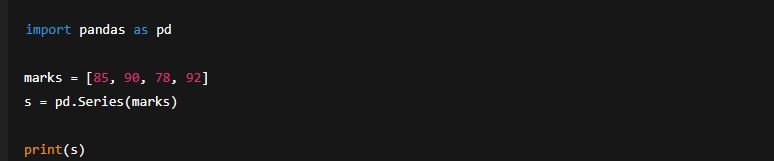
1. Creating a Series from a List
We can pass a Python list to the pd.Series() function.
OUTPUT
👉 Here:
Values = [85, 90, 78, 92]
Index = 0,1,2,3 (default integers).
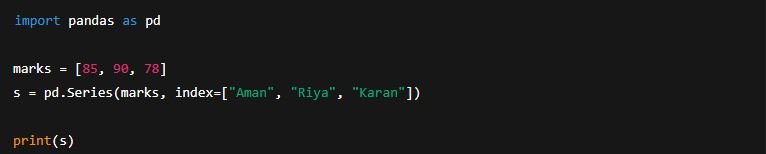
2. Creating a Series with Custom Index
We can give our own labels (instead of default numbers).
OUTPUT
3. Creating a Series from a Dictionary
When we pass a dictionary, the keys become the index and the values become the data.
OUTPUT
👉 Dictionary keys → Index (Maths, Science, English) 👉 Dictionary values → Data (85, 90, 78)
4. Creating a Series from a Scalar Value
If we give a single value, Pandas will repeat it for all indexes.
OUTPUT
👉 The value 100 is repeated for all indexes.
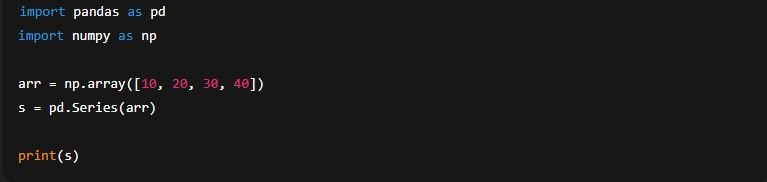
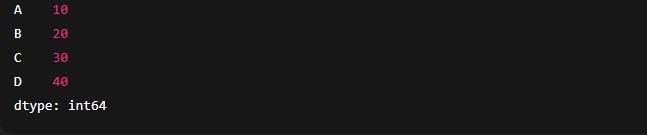
5. Creating a Series from a NumPy Array
Pandas can also take data from NumPy arrays.
OUTPUT
Key Points
Default index starts from 0 if not specified.
We can define custom index labels.
Series can be created from different data sources: lists, dictionaries, arrays, or scalars.
The dtype is automatically detected but can also be defined.
Series Object Attributes in Pandas
In Pandas, every Series object has some built-in attributes that provide important information about the Series. These attributes do not require parentheses (unlike functions). They are used to check the structure, size, labels, and other properties of the Series.
Attributes are helpful for understanding the data stored in the Series before performing operations like filtering, analysis, or visualization.
Common Attributes of a Series
1. s.index
Returns the index (labels) of the Series.
If no custom index is given, it shows default integer indexes.
Example:
OUTPUT
2. s.values
Returns all values of the Series as a NumPy array.
Example:
OUTPUT
3. s.dtype
Shows the data type of values stored in the Series.
Example:
OUTPUT
4. s.shape
Returns the shape of the Series in the form of a tuple.
Since Series is one-dimensional, it returns the number of elements.
Example:
OUTPUT
5. s.ndim
Returns the number of dimensions of the Series.
For Series, it is always 1.
Example:
OUTPUT
6. s.size
Returns the total number of elements in the Series.
Example:
OUTPUT
7. s.empty
Returns True if the Series has no elements, otherwise False.
Example:
OUTPUT
8. s.name
Returns the name of the Series (if assigned).
Can also be used to set a name for identification.
Example:
OUTPUT
9. s.nbytes
Returns the total memory consumed by the Series (in bytes).
Example:
OUTPUT
10. s.hasnans
Checks if the Series contains any NaN (missing values).
Example:
OUTPUT
Summary Table of Series Attributes
Attribute
Description
Example Output
s.index
Shows index labels
Index(['A','B','C'])
s.values
Shows data values as array
[10 20 30]
s.dtype
Data type of values
int64
s.shape
Number of elements (as tuple)
(3,)
s.ndim
Number of dimensions (always 1)
1
s.size
Count of elements
3
s.empty
True if Series has no data
False
s.name
Name of the Series
"Student Marks"
s.nbytes
Memory usage in bytes
24
s.hasnans
True if missing values are present
True / False
Accessing a Series Object and Its Elements
Once a Series is created in Pandas, we often need to view, select, or retrieve its data values. Pandas provides multiple ways to access elements in a Series – using indexes, labels, slicing, and functions.
This makes Series more powerful compared to simple Python lists, because we can use both positional indexes and label-based indexes.
1. Accessing Entire Series
We can simply print the Series object to see all of its elements.