
PYTHON.....
NOTES
Introduction to Dictionary in Python (Detailed Explanation)
In Python, a dictionary is a powerful and flexible built-in data structure designed to store data in the form of key–value pairs. Unlike sequences such as lists and tuples, which access elements using numeric index positions, dictionaries retrieve data using unique keys. This makes dictionaries ideal for representing real-world data where each value is naturally associated with a specific label or identifier.
A dictionary can be visualized as a mapping between keys and values. Each key serves as a reference or name, while the corresponding value holds the actual information. For example, in a student record, keys such as "roll_no", "name", and "marks" clearly describe the data they represent, making the structure intuitive and readable.
One of the most important characteristics of dictionaries is that keys must be unique and immutable. Immutable data types such as strings, numbers, and tuples can be used as keys, while mutable types like lists cannot. Values, on the other hand, can be of any data type, including numbers, strings, lists, tuples, sets, or even other dictionaries. This flexibility allows dictionaries to store both simple and complex data structures.
Dictionaries are unordered collections in concept (although they preserve insertion order in modern Python versions). This means data is not stored or accessed based on position but rather through logical keys. As a result, searching, inserting, and updating values in a dictionary is very fast and efficient, especially when working with large datasets.
Common real-life applications of dictionaries include:
Student records (roll number → student details)
Employee databases (employee ID → employee information)
Product catalogs (product code → price and description)
Configuration settings (option name → setting value)
2. Key Characteristics of Dictionary in Python (Theory in Detail)
A Python dictionary has several defining characteristics that distinguish it from other data structures such as lists and tuples. Understanding these characteristics is essential for correct usage in programs as well as for examination-oriented answers.
(a) Key–Value Pair Structure
A dictionary stores data in the form of key–value pairs, written as:

Each key acts as a unique identifier, and the value stores the associated data.
Every key in a dictionary is mapped to exactly one value, forming a one-to-one relationship.
This structure allows data to be stored in a meaningful way. Instead of remembering index positions, programmers can directly access values using descriptive keys. This improves readability, clarity, and maintainability of code.
(b) Unordered Collection (Exam Perspective)
In examination terms, dictionaries are considered unordered collections.
This means:
Elements are not accessed using index positions
Data is accessed only through keys
Unlike lists or tuples, where the position of elements matters, dictionaries focus on logical association. The order of insertion is not the basis for retrieval; instead, keys are used to locate values directly. This makes dictionaries efficient for fast lookups.
(c) Mutable
Dictionaries are mutable, which means they can be modified after creation. This includes:
Changing existing values
Adding new key–value pairs
Removing existing key–value pairs
Because of mutability, dictionaries are highly flexible and suitable for dynamic data such as user records, settings, and logs that may change during program execution.
(d) Keys Must Be Unique
Each key in a dictionary must be unique.
Duplicate keys are not allowed
If the same key is written more than once, the last assigned value overwrites the previous one
This uniqueness ensures that every key refers to a single, unambiguous value. It also prevents confusion during data retrieval and ensures reliable mapping between keys and values.
(e) Keys Must Be Immutable
Keys in a dictionary must be of immutable data types, meaning their value cannot change after creation.
Valid key types include:
intfloatstringtuple
Invalid key types include:
listdictionary
Mutable objects cannot be used as keys because their values can change, which would break the internal hashing mechanism of dictionaries. Immutability guarantees that keys remain constant and accessible throughout the program.
(f) Values Can Be Any Data Type
Unlike keys, dictionary values have no restrictions on data type. Values can be:
Numbers (int, float)
Strings
Lists
Tuples
Other dictionaries (nested dictionaries)
This feature makes dictionaries extremely powerful, as they can store simple data as well as complex and hierarchical structures. For example, a dictionary can contain lists of marks, tuples of coordinates, or even another dictionary representing detailed records.
3. Creating a Dictionary in Python (Detailed Explanation)
Creating a dictionary in Python is straightforward and flexible. A dictionary is defined using curly braces { }, where data is written in the form of key : value pairs, separated by commas. This method allows programmers to store structured and meaningful data efficiently.
Syntax for Creating a Dictionary
The general syntax of a dictionary is:

dict_nameis the variable name of the dictionaryEach key must be unique and immutable
Each value stores the associated data
Key–value pairs are separated by commas
This syntax clearly shows the mapping relationship between keys and values.
Example 1: Dictionary with String Keys

In this example:
"name","age", and"marks"are string keys"Aman",18, and85are the corresponding valuesThis structure is commonly used to represent student records, where each key clearly describes the data it holds
Such dictionaries are easy to read and understand, making them ideal for academic and real-life applications.
Example 2: Dictionary with Integer Keys

The keys are integers (
1,2,3)The values represent prices
Integer keys are often used when data is mapped using numeric identifiers such as item numbers or codes
This demonstrates that dictionary keys are not limited to strings; they can also be numbers.
Example 3: Dictionary with Mixed Data Types

In this dictionary:
"id"maps to an integer value"skills"maps to a list, which contains multiple valuesThis shows that dictionary values can be complex data structures
Such dictionaries are useful when storing detailed records that include multiple attributes of different data types.
Creating an Empty Dictionary
An empty dictionary can be created as follows:

This creates a dictionary with no key–value pairs initially.
Empty dictionaries are commonly used when:
Data is not available at the time of creation
Values need to be added dynamically during program execution
User input or computed results will be stored later
4. Accessing Dictionary Elements in Python (Detailed Explanation)
In Python, dictionary elements are accessed using keys, not index numbers. This is a fundamental difference between dictionaries and sequence-based data structures such as lists and tuples. Each key directly points to its associated value, allowing fast and meaningful data retrieval.
Accessing Values Using Keys
Syntax

dict_nameis the dictionary variablekeyis the unique identifier whose value you want to retrieveThe key must exist in the dictionary; otherwise, an error occurs
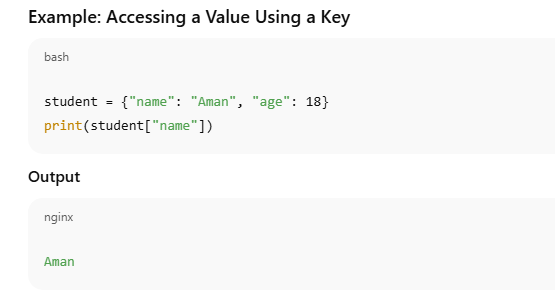
Explanation:
"name"is a key in the dictionaryThe expression
student["name"]retrieves the value associated with that keyThis method provides direct and fast access to data
This approach is commonly used when you are sure that the key exists in the dictionary.
Limitation of Direct Key Access
If you try to access a key that does not exist using this method, Python raises a KeyError, which may cause the program to stop unexpectedly. For example:

Using the get() Method (Safer Approach)
Python dictionaries provide the get() method, which safely retrieves values.
Syntax
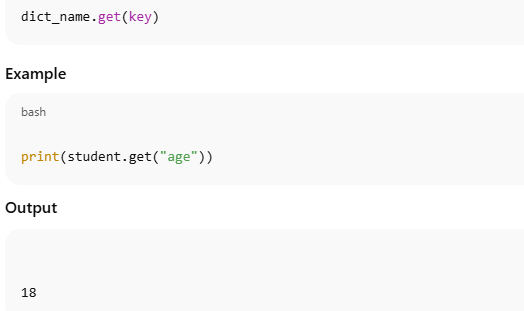
Key advantages of get():
It does not raise an error if the key is missing
If the key does not exist, it returns
Noneinstead of stopping the programThis makes programs more robust and error-resistant
Why get() Is Preferred in Practice
The get() method is especially useful when:
Working with user input
Accessing data from external sources (files, APIs, databases)
The presence of keys is not guaranteed
For example, checking optional data fields or configuration settings becomes safer with get().
5. Modifying Dictionary Elements in Python (Detailed Explanation)
One of the most important features of Python dictionaries is that they are mutable. This means that once a dictionary is created, its contents can be changed, updated, or extended without creating a new dictionary. This property makes dictionaries highly useful for handling dynamic and real-world data.
Updating an Existing Value
Dictionary values can be modified by assigning a new value to an existing key.
Syntax

Example: Modifying a Value
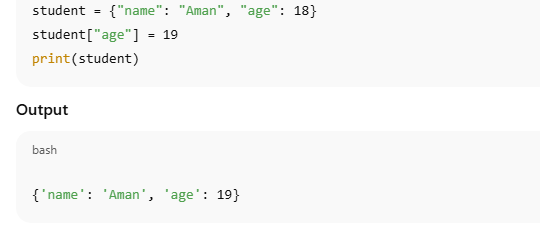
Explanation:
The key
"age"already exists in the dictionaryIts value is updated from
18to19The dictionary reflects the change immediately
This demonstrates that dictionaries do not require re-creation for updates.
Why Modification Is Useful
Modifying dictionary elements is especially useful in situations such as:
Updating a student’s age or marks
Changing configuration settings during program execution
Updating prices or quantities in inventory systems
Storing updated user information in applications
Because dictionaries allow direct access through keys, updates are fast and efficient.
Adding a New Key–Value Pair (Related Concept)
If the key used in assignment does not already exist, Python automatically adds it as a new key–value pair.

6. Adding Elements to a Dictionary in Python (Detailed Explanation)
Since dictionaries in Python are mutable, new elements can be added to an existing dictionary at any time. Adding elements means inserting new key–value pairs into the dictionary without affecting the existing data. This feature makes dictionaries extremely useful for applications where data grows or changes dynamically.
Adding a New Key–Value Pair Using Assignment
The simplest way to add an element to a dictionary is by assigning a value to a new key.
Syntax

Example: Adding a New Key–Value Pair
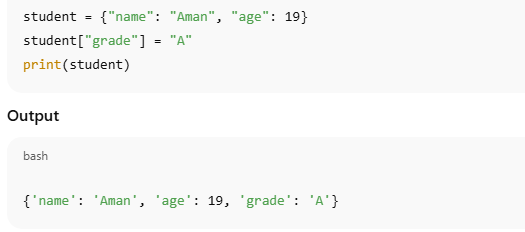
Explanation:
"grade"is a new key"A"is its corresponding valueThe dictionary is extended without recreating it
This method is commonly used when adding single elements to a dictionary.
Adding Elements Using the update() Method
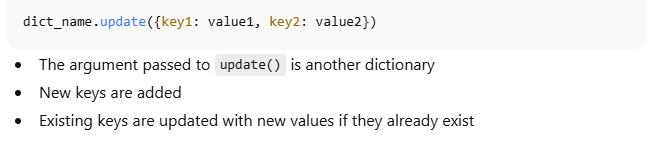
Python also provides the update() method, which allows adding one or more key–value pairs at once.
Syntax
Example: Using update()
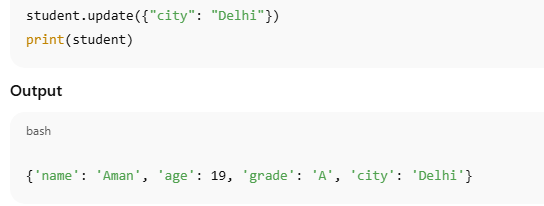
Explanation:
"city"is added as a new key"Delhi"is stored as its valueThis approach is efficient when multiple entries need to be added together
Difference Between Assignment and update()
Assignment method is best for adding or modifying a single key
update()method is preferred when adding multiple key–value pairs or merging dictionaries
Both methods modify the original dictionary directly.
7. Removing Elements from a Dictionary in Python (Detailed Explanation)
In Python, dictionaries provide multiple methods to remove elements depending on the requirement. Since dictionaries are mutable, key–value pairs can be deleted either individually or entirely. Understanding these methods is important for effective data management and is commonly tested in examinations.
1. pop() Method – Remove by Key
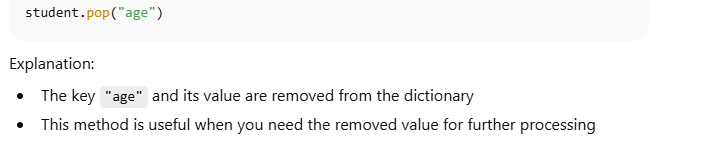
The pop() method removes a specific key–value pair using its key and returns the removed value.

The specified key is removed from the dictionary
The corresponding value is returned
If the key does not exist, it raises a KeyError
2. del Keyword – Delete a Key–Value Pair
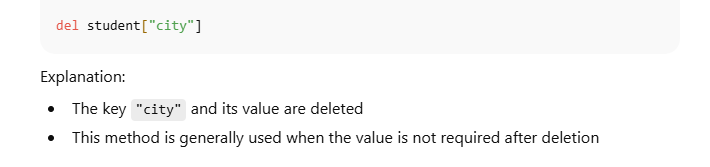
The del keyword is used to permanently delete a specific key–value pair from the dictionary.
Syntax

Removes the key and its associated value
Does not return any value
Raises a KeyError if the key is not present
3. clear() Method – Remove All Elements
The clear() method removes all key–value pairs from the dictionary, leaving it empty.
Syntax
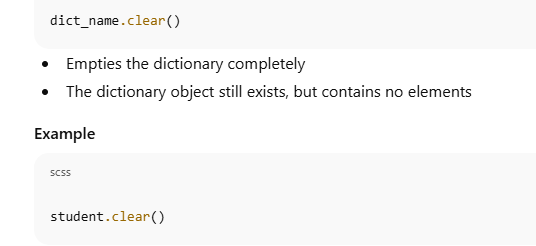
Explanation:
All data inside the dictionary is deleted
The result is an empty dictionary
{}
| Method | Removes | Returns Value | Use Case |
|---|---|---|---|
pop(key) |
Single key–value pair | Yes | When removed value is needed |
del dict[key] |
Single key–value pair | No | Permanent deletion |
clear() |
All elements | No | Reset dictionary |
pop()removes a specific element and returns its valuedeldeletes a key–value pair permanentlyclear()removes all elements and empties the dictionaryAll methods modify the dictionary directly
8. Important Dictionary Functions in Python (Detailed Explanation)
Python provides several built-in functions that can be applied directly to dictionaries. These functions generally operate on the keys of the dictionary (not the values), unless explicitly stated otherwise. Understanding this behavior is important for both examinations and correct program logic.
Commonly Used Dictionary Functions
| Function | Use |
|---|---|
len() |
Returns the number of key–value pairs |
max() |
Returns the largest key |
min() |
Returns the smallest key |
sum() |
Returns the sum of all keys (numeric only) |
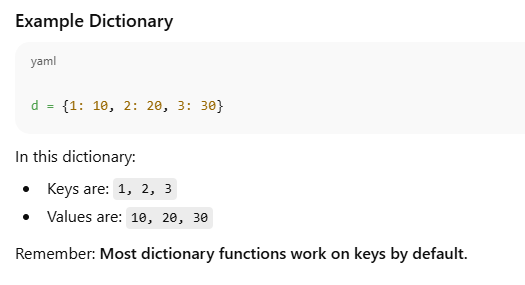
len() Function – Number of Key–Value Pairs
The len() function returns the total number of key–value pairs in the dictionary.
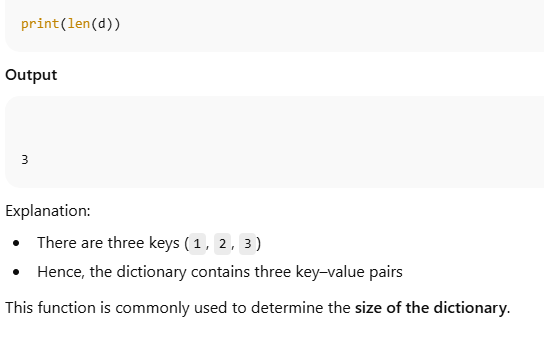
max() Function – Largest Key
The max() function returns the largest key in the dictionary.
min() Function – Smallest Key
The min() function returns the smallest key in the dictionary.
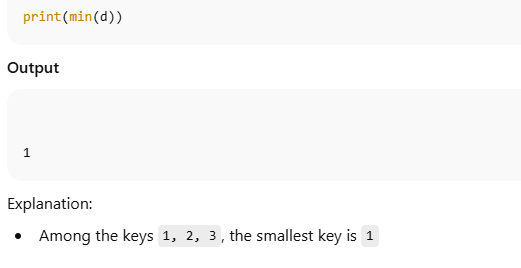
sum() Function – Sum of Keys
The sum() function returns the sum of all numeric keys.
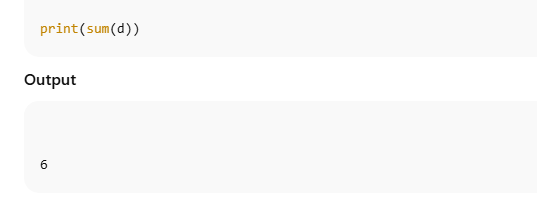
Explanation:
Keys are
1 + 2 + 3Sum =
6Values (
10, 20, 30) are not included
⚠️ Important:
sum()works only if all keys are numericUsing it with string keys will cause an error
Key Points to Remember (Exam-Oriented)
Dictionary functions operate on keys, not values
len()counts key–value pairsmax()andmin()compare keyssum()adds numeric keys onlyValues require explicit access using
values()

9. Common Dictionary Methods in Python (Detailed Explanation)
Python dictionaries provide several built-in methods that help in accessing, viewing, and managing dictionary data efficiently. These methods allow programmers to retrieve keys, values, and key–value pairs in a structured manner without modifying the dictionary.
Commonly Used Dictionary Methods
| Method | Purpose |
|---|---|
keys() |
Returns all keys |
values() |
Returns all values |
items() |
Returns key–value pairs |
copy() |
Creates a copy of the dictionary |
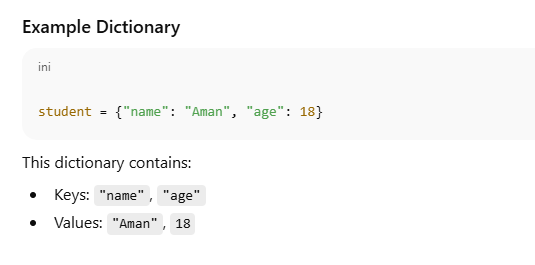
keys() Method – Returns All Keys
The keys() method returns a view object containing all the keys present in the dictionary.
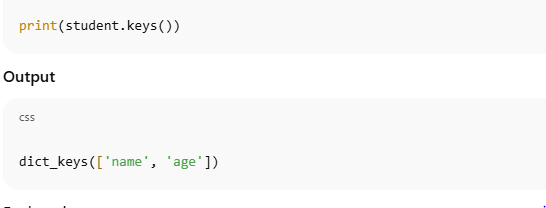
Explanation:
Displays all keys in the dictionary
The result updates automatically if the dictionary changes
Commonly used when iterating through dictionary keys
values() Method – Returns All Values
The values() method returns a view object containing all the values stored in the dictionary.
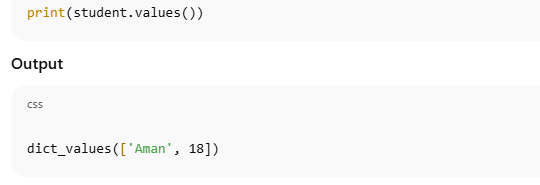
Explanation:
Shows all values without their keys
Useful when only the data values are required
Works dynamically with dictionary updates
items() Method – Returns Key–Value Pairs
The items() method returns all dictionary elements as key–value pairs in the form of tuples.
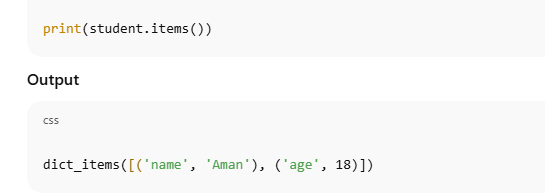
Explanation:
Each element is a tuple
(key, value)Commonly used in loops for processing both keys and values together
copy() Method – Copy Dictionary
The copy() method creates a shallow copy of the dictionary.

Explanation:
A new dictionary object is created
Changes to the new dictionary do not affect the original dictionary
Useful when preserving original data while working on modifications
Key Points to Remember (Exam-Oriented)
These methods do not modify the dictionary
They return view objects, not lists
Dictionary views reflect changes automatically
items()returns tuples of key–value pairscopy()is used to duplicate dictionary data safely
10. Looping Through a Dictionary in Python (Detailed Explanation)
Looping through a dictionary is a common and essential operation in Python. Since dictionaries store data in the form of key–value pairs, Python provides multiple ways to iterate over them depending on whether you need only keys, only values, or both keys and values together. Understanding these looping techniques is important for data processing, validation, and reporting.
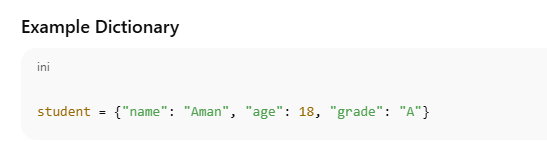
This dictionary contains:
Keys:
"name","age","grade"Values:
"Aman",18,"A"
Looping Through Keys (Default Behavior)
When a dictionary is used directly in a for loop, Python iterates over the keys by default.
Syntax
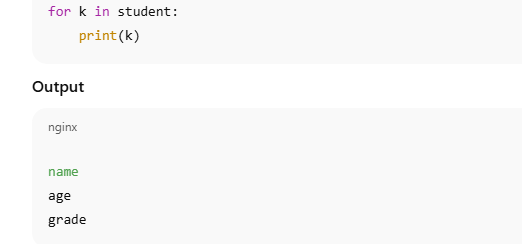
Explanation:
Each iteration assigns a key to the variable
kThis method is useful when only the identifiers are required
It is commonly used when accessing values later using keys
Looping Through Values
If only values are needed, the values() method is used.
Syntax
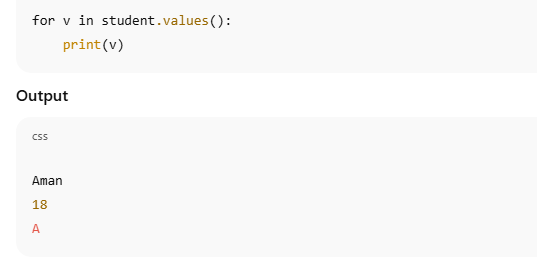
Explanation:
The loop iterates over dictionary values
Keys are ignored
Useful when performing calculations or displaying stored data
Looping Through Key–Value Pairs
To access both keys and values simultaneously, the items() method is used.
Syntax
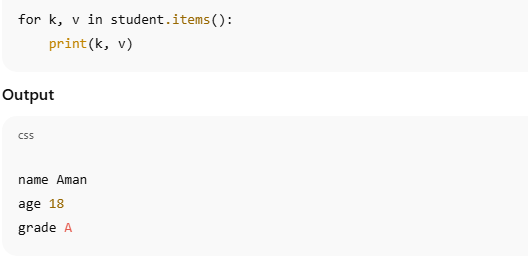
Explanation:
Each element is returned as a tuple
(key, value)Tuple unpacking assigns the key to
kand value tovThis is the most commonly used looping method in practice
| Requirement | Recommended Method |
|---|---|
| Only keys |
for k in dict or dict.keys()
|
| Only values |
dict.values()
|
| Keys and values together |
dict.items()
|
Dictionaries can be looped in multiple ways
Default iteration is over keys
values()provides access to only valuesitems()allows simultaneous access to keys and valuesProper selection of looping method improves clarity and efficiency
Mastering dictionary iteration is essential for effective Python programming and is a frequently tested concept in academic examinations as well as real-world applications.