
Python Collections and Library
Python Collections and Library.
Python Tuples: A Comprehensive Guide
A tuple is an ordered, immutable collection in Python that stores multiple items.
It is similar to a list but has fixed values, meaning we cannot modify, add, or remove items after creation.
Tuples are used when:
✅ We want data to remain unchanged.
✅ We need faster execution (tuples are quicker than lists).
✅ We need a hashable object (tuples can be used as dictionary keys).
📍 Key Characteristics of Tuples.
Ordered → Elements retain their position.
Immutable → Cannot modify elements after creation.
Heterogeneous → Can store multiple data types.
Faster than lists → Tuples have better performance.
Allow Duplicates → Unlike sets, tuples can have repeated values.
Can be used as dictionary keys → Because tuples are immutable.
📍 Properties of Tuples
✅ 1. Ordered
The order of elements remains fixed.
fruits = ("apple", "banana", "cherry")
print(fruits[0])  # apple
print(fruits[1])  # banana
✅ 2. Immutable
Cannot change elements after creation.
numbers = (1, 2, 3)
numbers[0] = 10  # ❌ TypeError: 'tuple' object does not support item assignment
✅ 3. Can Store Mixed Data Types.
data = ("John", 25, 5.8, True)
print(data)
✅ 4. Allows Duplicate Values.
numbers = (1, 2, 3, 1, 2, 3)
print(numbers)  # (1, 2, 3, 1, 2, 3)
✅ 5. Can be Nested.
nested_tuple = (("a", "b"), (1, 2, 3))
print(nested_tuple)
📍 Creating a Tuple.
Tuples can be created using parentheses
()or thetuple()function.
🔹 Syntax
tuple_name = (element1, element2, element3, …)
🔹 Examples
# Tuple of integers
numbers = (10, 20, 30, 40)

# Tuple of strings
fruits = ("apple", "banana", "cherry")

# Mixed data types
mixed = (1, "hello", 3.14, True)

# Nested tuple (tuple inside a tuple)
nested = ((1, 2, 3), ("a", "b", "c"))

# Empty tuple
empty_tuple = ()

print(numbers)
print(fruits)
print(mixed)
print(nested)
print(empty_tuple)
📍 Single-Element Tuples.
A tuple with one element must have a trailing comma
,.
single = (5,)  # ✅ Tuple
not_a_tuple = (5)  # ❌ Just an integer

print(type(single))  # Output:
print(type(not_a_tuple))  # Output:
📍 Indexing in Tuples
Tuple elements are indexed starting from
0(like lists).
| Element | "Apple" | "Banana" | "Cherry" |
|---|---|---|---|
| Index | 0 | 1 | 2 |
| Index | -3 | -2 | -1 |
fruits = ("apple", "banana", "cherry")

print(fruits[0])  # Apple
print(fruits[-1])  # Cherry
print(fruits[1])  # Banana
📍 Slicing in Tuples
Tuples support slicing, allowing us to extract specific portions.
🔹 Syntax
tuple[start:end:step]
start→ Beginning index (default0).end→ Exclusive stopping index.step→ Skips elements (default1).
numbers = (10, 20, 30, 40, 50, 60, 70)

print(numbers[1:4])    # (20, 30, 40)
print(numbers[:3])     # (10, 20, 30)
print(numbers[3:])     # (40, 50, 60, 70)
print(numbers[::2])    # (10, 30, 50, 70)
print(numbers[::-1])   # (70, 60, 50, 40, 30, 20, 10)  (Reverse)
📍 Changing Tuples (Workarounds).
Tuples cannot be modified, but we can convert them to lists.
✅ 1. Changing Values.
fruits = ("apple", "banana", "cherry")

# Convert tuple to list, modify, and convert back
temp_list = list(fruits)
temp_list[1] = "orange"
fruits = tuple(temp_list)

print(fruits)  # ('apple', 'orange', 'cherry')
✅ 2. Adding Elements.
numbers = (10, 20, 30)

# Adding an element by creating a new tuple
numbers = numbers + (40,)
print(numbers)  # (10, 20, 30, 40)
✅ 3. Removing Elements.
fruits = ("apple", "banana", "cherry")

temp_list = list(fruits)
temp_list.remove("banana")
fruits = tuple(temp_list)

print(fruits)  # ('apple', 'cherry')
📍 Tuple Methods.
✅ 1. count() – Count Occurrences.
numbers = (1, 2, 2, 3, 2, 4)
print(numbers.count(2))  # 3
✅ 2. index() – Find First Occurrence
fruits = ("apple", "banana", "cherry", "banana")
print(fruits.index("banana"))  # 1
Packing & Unpacking Tuples
✅ Tuple Packing
person = ("Alice", 30, "Engineer")
print(person)
✅ Tuple Unpacking
name, age, job = person
print(name)  # Alice
print(age)   # 30
print(job)   # Engineer
📍 Iterating Over Tuples.
✅ Using a for Loop
fruits = ("apple", "banana", "cherry")

for fruit in fruits:
    print(fruit)
✅ Using while Loop
index = 0
while index < len(fruits):
    print(fruits[index])
    index += 1
Checking for Elements.
fruits = ("apple", "banana", "cherry")
print("banana" in fruits)  # True
print("orange" in fruits)  # False
Using Tuples as Dictionary Keys
coordinates = {
    (10, 20): "Point A",
    (30, 40): "Point B"
}

print(coordinates[(10, 20)])  # "Point A"
Deleting a Tuple
fruits = ("apple", "banana", "cherry")
del fruits  # Deletes the tuple completely
Tuple vs List Comparison
| Feature | Tuple | List |
|---|---|---|
| Mutable? | ❌ No | ✅ Yes |
| Speed | ✅ Fast | ❌ Slower |
| Syntax | () | [] |
| Methods | Few | More |
| Uses | Fixed data | Dynamic data |
Built-in Functions in Tuples
| Function | Description | Example |
|---|---|---|
Python Sets: A Comprehensive Guide
A set in Python is an unordered, mutable, and unique collection of elements.
Unlike lists and tuples, sets do not allow duplicate values and are defined using curly braces
{}.
✅ Why Use Sets?
To remove duplicates from a collection.
To perform mathematical operations like union, intersection, and difference.
To store unique elements efficiently.
📍 1. Declaring a Set
Sets are declared using curly braces {} or the set() constructor.
✅ 1. Creating a Set
fruits = {"apple", "banana", "cherry"}
print(fruits)  # Output: {'banana', 'cherry', 'apple'} (Order is random)
✅ 2. Creating an Empty Set.
empty_set = set()  # ✅ Correct way
print(type(empty_set))  # Output:
Properties of Sets
✅ 1. Unordered – Elements do not maintain a fixed position.
✅ 2. Unique – Duplicate values are automatically removed.
✅ 3. Mutable – We can add or remove elements.
✅ 4. Cannot Contain Mutable Items – Lists and dictionaries cannot be set elements.
📍 Accessing Set Data
Since sets are unordered, we cannot access elements using an index like lists or tuples.
✅ 1. Using a Loop
fruits = {"apple", "banana", "cherry"}
for fruit in fruits:
    print(fruit)
✅ 2. Checking for Membership (in Operator).
print("banana" in fruits)  # Output: True
print("orange" in fruits)  # Output: False
📍 Set Methods.
Python provides several built-in set methods for adding, removing, and modifying sets.
🔹 1. add() – Adds an Element.
fruits = {"apple", "banana"}
fruits.add("cherry")
print(fruits)  # {'apple', 'banana', 'cherry'}
Duplicate values are ignored:
fruits.add("banana")
print(fruits)  # {'apple', 'banana', 'cherry'} (No duplicate added)
🔹 2. clear() – Removes All Elements
fruits = {"apple", "banana", "cherry"}
fruits.clear()
print(fruits)  # Output: set()
🔹 3. copy() – Creates a Copy
original_set = {1, 2, 3}
new_set = original_set.copy()
print(new_set)  # Output: {1, 2, 3}
Changes to
new_setwon’t affectoriginal_set.
new_set.add(4)
print(original_set)  # Output: {1, 2, 3} (unchanged)
🔹 4. discard() – Removes an Element (No Error if Not Found).
fruits = {"apple", "banana", "cherry"}
fruits.discard("banana")
print(fruits)  # {'apple', 'cherry'}

fruits.discard("orange")  # No error
🔹 5. pop() – Removes and Returns a Random Element.
numbers = {10, 20, 30, 40}
removed_item = numbers.pop()
print(removed_item)  # Randomly removes an element
print(numbers)
🔹 6. remove() – Removes an Element (Throws Error if Not Found)
fruits = {"apple", "banana", "cherry"}
fruits.remove("banana")
print(fruits)  # {'apple', 'cherry'}

fruits.remove("orange")  # ❌ KeyError: 'orange'
🔹 7. union() – Combines Two Sets (Returns a New Set)
A = {1, 2, 3}
B = {3, 4, 5}
result = A.union(B)
print(result)  # Output: {1, 2, 3, 4, 5}
🔹 8. update() – Adds Elements from Another Set.
A = {1, 2, 3}
B = {3, 4, 5}
A.update(B)  # Modifies A
print(A)  # {1, 2, 3, 4, 5}
📍 Set Operations.
Python sets support mathematical operations like union, intersection, and difference.
✅ 1. | (Union) – Combines Sets.
A = {1, 2, 3}
B = {3, 4, 5}
print(A | B)  # {1, 2, 3, 4, 5}
✅ 2. & (Intersection) – Common Elements.
print(A & B) # {3}
✅ 3. - (Difference) – Elements in A but not in B
print(A - B) # {1, 2}
✅ 4. ^ (Symmetric Difference) – Elements Not in Both Sets
print(A ^ B) # {1, 2, 4, 5}
📍 Iterating Over a Set.
✅ Using a for Loop.
fruits = {"apple", "banana", "cherry"}
for fruit in fruits:
    print(fruit)
📍 Checking if a Set is a Subset, Superset, or Disjoint
✅ 1. issubset() – Checks if A is a Subset of B
A = {1, 2}
B = {1, 2, 3, 4}
print(A.issubset(B))  # True
✅ 2. issuperset() – Checks if A is a Superset of B.
print(B.issuperset(A)) # True
✅ 3. isdisjoint() – Checks if Two Sets Have No Common Elements
C = {5, 6, 7}
print(A.isdisjoint(C))  # True
Frozen Sets (Immutable Sets).
- A frozen set is an immutable version of a set.
fs = frozenset({1, 2, 3})
print(fs)

# fs.add(4)  # ❌ AttributeError: 'frozenset' object has no attribute 'add'
Set vs List vs Tuple.
| Feature | Set | List | Tuple |
|---|---|---|---|
| Mutable? | ✅ Yes | ✅ Yes | ❌ No |
| Duplicates? | ❌ No | ✅ Yes | ✅ Yes |
| Ordered? | ❌ No | ✅ Yes | ✅ Yes |
| Indexing? | ❌ No | ✅ Yes | ✅ Yes |
| Performance | 🔥 Fastest | 🔸 Medium | 🔸 Medium |
Python Dictionary: A Comprehensive Guide.
A dictionary in Python is a mutable, unordered collection of key-value pairs.
Unlike lists and tuples, which are indexed by numbers, dictionaries use keys to access values.
✅ Why Use Dictionaries?
Fast lookups (searching for a value using a key is efficient).
Flexible keys (can be strings, numbers, or even tuples).
Stores structured data (like JSON format).
📍 1. Creating a Dictionary
Dictionaries are defined using curly braces {} with key-value pairs separated by colons :.
✅ 1. Creating a Dictionary with Values
student = {
    "name": "John",
    "age": 22,
    "course": "Computer Science"
}
print(student)
🔹 Keys – "name", "age", "course"
🔹 Values – "John", 22, "Computer Science"
✅ 2. Creating an Empty Dictionary.
empty_dict = {}  # ✅ Correct way
print(type(empty_dict))  # Output:
✅ 3. Using dict() Constructor.
student = dict(name="John", age=22, course="CS")
print(student)  # {'name': 'John', 'age': 22, 'course': 'CS'}
2. Accessing Dictionary Elements.
We use keys to access dictionary values.
✅ 1. Accessing Using [] (Bracket Notation)
student = {"name": "Alice", "age": 21}
print(student["name"])  # Output: Alice
🔹 KeyError: If the key does not exist:
print(student["address"]) # ❌ KeyError: 'address'
✅ 2. Accessing Using get() Method (Safer)
print(student.get("name"))  # Output: Alice
print(student.get("address", "Not Found"))  # Output: Not Found
📍 Adding Elements to a Dictionary
student["address"] = "New York"
print(student)  # {'name': 'Alice', 'age': 21, 'address': 'New York'}
📍 Updating Dictionary Values
student["age"] = 22
print(student)  # {'name': 'Alice', 'age': 22, 'address': 'New York'}
📍 Removing Elements from a Dictionary.
Python provides several methods to remove dictionary elements.
✅ 1. pop() – Removes a Specific Key
student = {"name": "Alice", "age": 21, "course": "CS"}
age = student.pop("age")
print(student)  # {'name': 'Alice', 'course': 'CS'}
print(age)  # 21
🔹 If key does not exist, pop() throws a KeyError:
student.pop("address") # ❌ KeyError: 'address'
✅ 2. popitem() – Removes the Last Inserted Key-Value Pair.
student = {"name": "Alice", "age": 21, "course": "CS"}
item = student.popitem()
print(student)  # {'name': 'Alice', 'age': 21}
print(item)  # ('course', 'CS') (last added pair)
🔹 If dictionary is empty, popitem() raises an error.
✅ 3. del – Deletes a Specific Key
del student["age"]
print(student)  # {'name': 'Alice'}
🔹 Deleting the Entire Dictionary
del student
print(student)  # ❌ NameError: name 'student' is not defined
✅ 4. clear() – Removes All Elements.
student = {"name": "Alice", "age": 21}
student.clear()
print(student)  # Output: {}
📍 Dictionary Methods
Python provides useful dictionary methods for accessing and modifying data.
🔹 1. get() – Retrieves a Value (Safer than [])
student = {"name": "Alice", "age": 21}
print(student.get("name"))  # Alice
print(student.get("address", "Not Found"))  # Not Found
🔹 2. pop() – Removes a Key and Returns its Value.
student = {"name": "Alice", "age": 21}
age = student.pop("age")
print(student)  # {'name': 'Alice'}
print(age)  # 21
🔹 3. popitem() – Removes and Returns the Last Inserted Pair.
student = {"name": "Alice", "age": 21}
item = student.popitem()
print(item)  # ('age', 21)
print(student)  # {'name': 'Alice'}
🔹 4. clear() – Removes All Elements
student.clear()
print(student)  # {}
🔹 5. copy() – Creates a Copy.
student = {"name": "Alice", "age": 21}
copy_student = student.copy()
print(copy_student)  # {'name': 'Alice', 'age': 21}
🔹 Modifying copy_student does not affect the original dictionary:
copy_student["age"] = 22
print(student)  # {'name': 'Alice', 'age': 21} (unchanged)
print(copy_student)  # {'name': 'Alice', 'age': 22}
📍 Looping Through a Dictionary
✅ 1. Looping Over Keys
student = {"name": "Alice", "age": 21}
for key in student:
    print(key)  # name, age
✅ 2. Looping Over Values
for value in student.values():
    print(value)  # Alice, 21
✅ 3. Looping Over Key-Value Pairs
for key, value in student.items():
    print(f"{key}: {value}")
📍 Dictionary vs List vs Tuple
| Feature | Dictionary | List | Tuple |
|---|---|---|---|
| Mutable? | ✅ Yes | ✅ Yes | ❌ No |
| Key-Based Access? | ✅ Yes | ❌ No | ❌ No |
| Indexed Access? | ❌ No | ✅ Yes | ✅ Yes |
| Order Maintained? | ✅ Yes (Python 3.7+) | ✅ Yes | ✅ Yes |
| Duplicates? | ❌ No (Unique Keys) | ✅ Yes | ✅ Yes |
Introduction to NumPy and Pandas in Python.
NumPy and Pandas are two essential libraries in Python for data analysis, numerical computing, and scientific computing.
✅ Why Use NumPy and Pandas?
NumPy provides high-performance array operations.
Pandas is used for data manipulation and analysis (works well with tabular data like Excel or CSV).
Faster than Python lists because they use vectorized operations.
Supports large datasets efficiently.
📍 Introduction to NumPy
NumPy (Numerical Python) is a high-performance library for numerical computations in Python.
✅ Features of NumPy:
Provides multi-dimensional arrays (
ndarray).Supports mathematical operations (addition, multiplication, statistics).
Optimized for performance and memory efficiency.
Used in Machine Learning, Data Science, and AI.
📍 Installing and Importing NumPy
✅ Installation (if not installed)
pip install numpy
✅ Importing NumPy
import numpy as np
📍 Creating a NumPy Array.
A NumPy array is similar to a Python list but faster and more efficient.
✅ Creating a 1D NumPy Array from a List
import numpy as np
arr = np.array([1, 2, 3, 4, 5])
print(arr)  # Output: [1 2 3 4 5]
print(type(arr))  # Output:
✅ Creating a 2D NumPy Array
arr_2d = np.array([[1, 2, 3], [4, 5, 6]])
print(arr_2d)
📍 4. NumPy Statistical Methods
NumPy provides powerful statistical functions for numerical analysis.
🔹 1. mean() – Calculates the Mean (Average)
The mean is the sum of all values divided by the total number of values.
import numpy as np
data = np.array([10, 20, 30, 40, 50])
mean_value = np.mean(data)
print(mean_value)  # Output: 30.0
🔹 2. median() – Finds the Middle Value
The median is the middle value of a sorted dataset.
data = np.array([1, 3, 5, 7, 9])
median_value = np.median(data)
print(median_value)  # Output: 5
🔹 If the dataset has an even number of values, the median is the average of the two middle numbers.
🔹 3. mode() – Finds the Most Frequent Value
NumPy does not have a built-in mode() function, but we can use SciPy for mode calculation.
from scipy import stats
data = np.array([1, 2, 2, 3, 3, 3, 4, 5])
mode_value = stats.mode(data)
print(mode_value.mode)  # Output: [3]
🔹 The mode is the value that appears most frequently in the dataset.
🔹 4. std() – Standard Deviation
Standard Deviation measures how spread out the values are in the dataset.
data = np.array([10, 20, 30, 40, 50])
std_dev = np.std(data)
print(std_dev)  # Output: 14.142135623730951
🔹 Higher Standard Deviation → More spread out data.
🔹 Lower Standard Deviation → Data is closer to the mean.
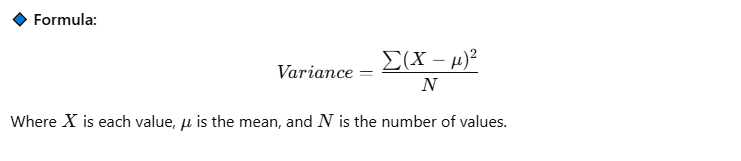
🔹 5. var() – Variance
Variance is the square of Standard Deviation and measures how far values are from the mean.
data = np.array([10, 20, 30, 40, 50])
variance = np.var(data)
print(variance)  # Output: 200.0
📍 Applying NumPy Methods on a List
We can use NumPy functions on a numerical list.
✅ Example:
import numpy as np
data_list = [10, 20, 30, 40, 50]

# Convert list to NumPy array
data = np.array(data_list)

# Compute statistical values
print("Mean:", np.mean(data))
print("Median:", np.median(data))
print("Standard Deviation:", np.std(data))
print("Variance:", np.var(data))