
Class 12th IP (065)
Practical 10
SOLUTION :-
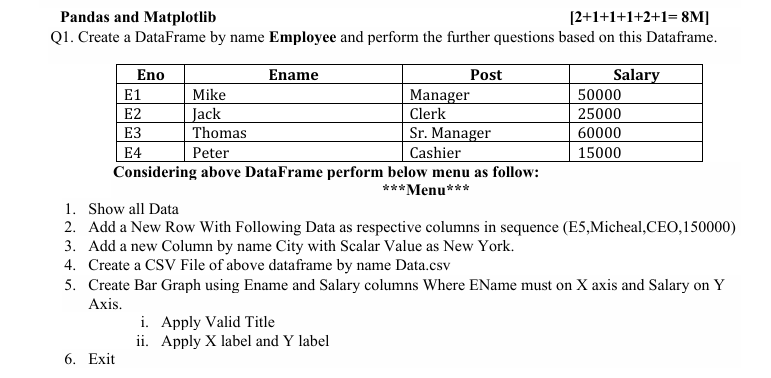
import pandas as pd
import matplotlib.pyplot as plt

Employee = pd.DataFrame({
    'Eno': ['E1', 'E2', 'E3', 'E4'],
    'Ename': ['Mike', 'Jack', 'Thomas', 'Peter'],
    'Post': ['Manager', 'Clerk', 'Sr. Manager', 'Cashier'],
    'Salary': [50000, 25000, 60000, 15000]
})

print(Employee)
while True:
    print("\n*** MENU ***")
    print("1. Show All Data")
    print("2. Add New Row")
    print("3. Add City Column")
    print("4. Create CSV File")
    print("5. Create Bar Graph")
    print("6. Exit")

    ch = int(input("Enter your choice: "))

    if ch == 1:
        print(Employee)

    elif ch == 2:
        Employee.loc[len(Employee)] = ['E5', 'Micheal', 'CEO', 150000]
        print("New row added successfully")

    elif ch == 3:
        Employee['City'] = 'New York'
        print(Employee)

    elif ch == 4:
        Employee.to_csv("Data.csv", index=False)
        print("CSV file created successfully")

    elif ch == 5:
        plt.bar(Employee['Ename'], Employee['Salary'])
        plt.title("Employee Salary Report")
        plt.xlabel("Employee Name")
        plt.ylabel("Salary")
        plt.show()

    elif ch == 6:
        break

    else:
        print("Invalid Choice")
SOLUTION
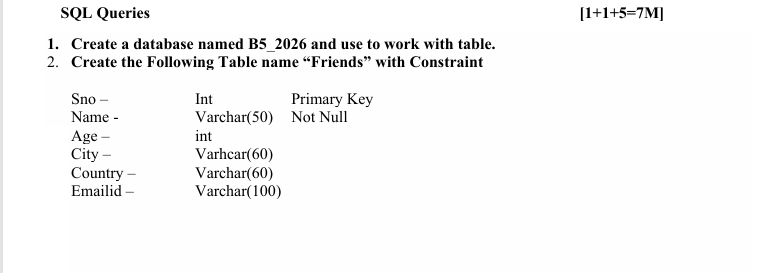
Create Database
CREATE DATABASE B5_2026;
USE B5_2026;
Create Table Hospital
CREATE TABLE Friends (
    Sno INT PRIMARY KEY,
    Name VARCHAR(50) NOT NULL,
    Age INT,
    City VARCHAR(60),
    Country VARCHAR(60),
    Emailid VARCHAR(100)
);
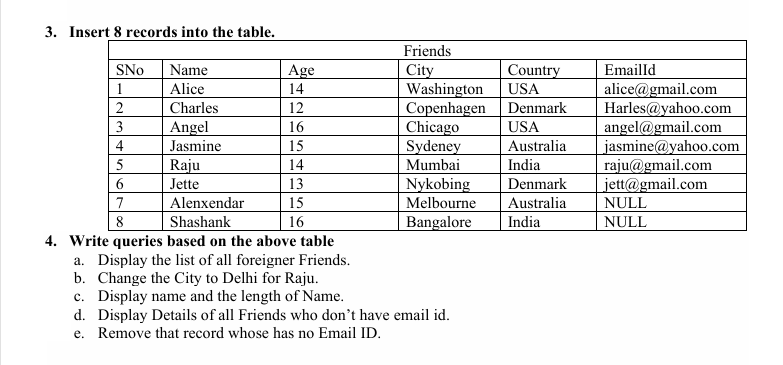
Insert 8 Records
INSERT INTO Friends VALUES
(1,'Alice',14,'Washington','USA','alice@gmail.com'),
(2,'Charles',12,'Copenhagen','Denmark','Harles@yahoo.com'),
(3,'Angel',16,'Chicago','USA','angel@gmail.com'),
(4,'Jasmine',15,'Sydeney','Australia','jasmine@yahoo.com'),
(5,'Raju',14,'Mumbai','India','raju@gmail.com'),
(6,'Jette',13,'Nykobing','Denmark','jett@gmail.com'),
(7,'Alenxendar',15,'Melbourne','Australia',NULL),
(8,'Shashank',16,'Bangalore','India',NULL);
4. SQL Queries
a) Display list of all foreigner friends (not from India)
SELECT * FROM Friends
WHERE Country <> 'India';
b) Change the City to Delhi for Raju
UPDATE Friends
SET City = 'Delhi'
WHERE Name = 'Raju';
c) Display Name and length of Name
SELECT Name, LENGTH(Name) AS Name_Length
FROM Friends;
d) Display details of friends who do not have Email ID
SELECT * FROM Friends
WHERE Emailid IS NULL;
e) Remove records which have no Email ID
DELETE FROM Friends
WHERE Emailid IS NULL;