
Class 12th IP (065)
Practical 8
SOLUTION :-
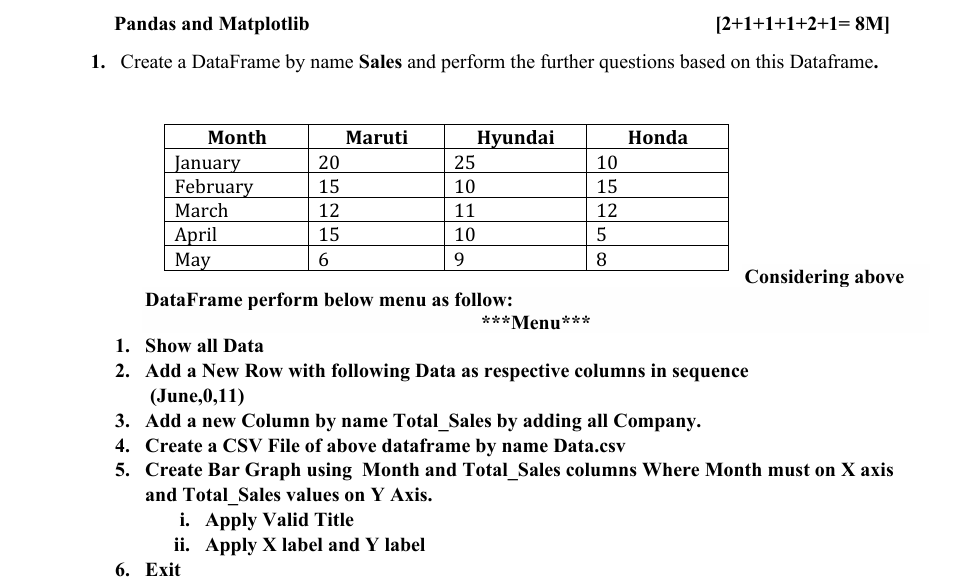
import pandas as pd
import matplotlib.pyplot as plt

Sales = pd.DataFrame({
    'Month': ['January', 'February', 'March', 'April', 'May'],
    'Maruti': [20, 15, 12, 15, 6],
    'Hyundai': [25, 10, 11, 10, 9],
    'Honda': [10, 15, 12, 5, 8]
})

print(Sales)

while True:
    print("\n*** MENU ***")
    print("1. Show All Data")
    print("2. Add New Row")
    print("3. Add Total_Sales Column")
    print("4. Create CSV File")
    print("5. Create Bar Graph")
    print("6. Exit")

    ch = int(input("Enter your choice: "))

    if ch == 1:
        print(Sales)

    elif ch == 2:
        Sales.loc[len(Sales)] = ['June', 0, 0, 11]
        print("New row added successfully")

    elif ch == 3:
        Sales['Total_Sales'] = Sales['Maruti'] + Sales['Hyundai'] + Sales['Honda']
        print(Sales)

    elif ch == 4:
        Sales.to_csv("Data.csv", index=False)
        print("CSV file created successfully")

    elif ch == 5:
        plt.bar(Sales['Month'], Sales['Total_Sales'])
        plt.title("Monthly Total Car Sales")
        plt.xlabel("Month")
        plt.ylabel("Total Sales")
        plt.show()

    elif ch == 6:
        break

    else:
        print("Invalid Choice")

SOLUTION
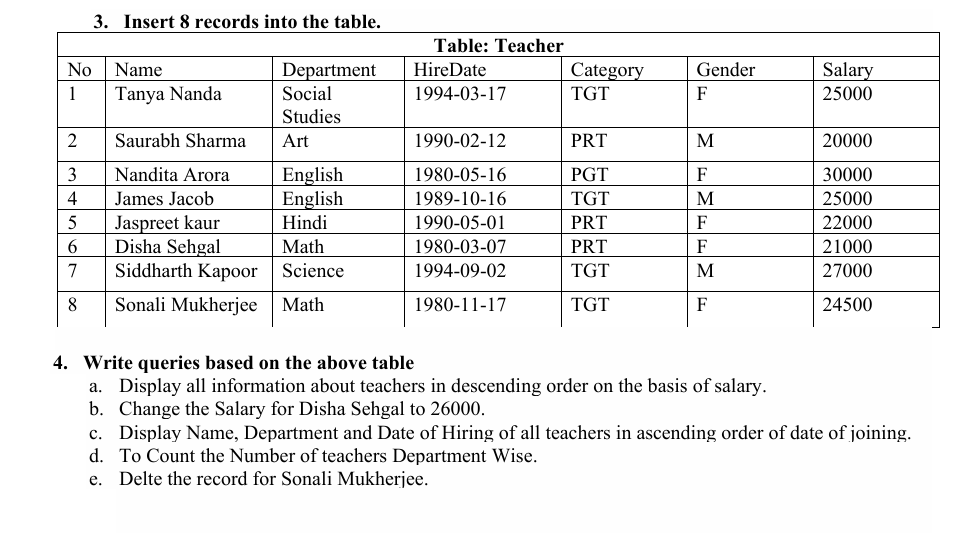
Create Database
CREATE DATABASE B3_2026;
USE B3_2026;
Create Table Teacher
CREATE TABLE Teacher (
    No INT PRIMARY KEY,
    Name VARCHAR(50),
    Department VARCHAR(50),
    HireDate DATE,
    Category VARCHAR(20),
    Gender VARCHAR(1),
    Salary INT
);
Insert 8 Records
INSERT INTO Teacher VALUES
(1,'Tanya Nanda','Social Studies','1994-03-17','TGT','F',25000),
(2,'Saurabh Sharma','Art','1990-02-12','PRT','M',20000),
(3,'Nandita Arora','English','1980-05-16','PGT','F',30000),
(4,'James Jacob','English','1989-10-16','TGT','M',25000),
(5,'Jaspreet Kaur','Hindi','1990-05-01','PRT','F',22000),
(6,'Disha Sehgal','Math','1980-03-07','PRT','F',21000),
(7,'Siddharth Kapoor','Science','1994-09-02','TGT','M',27000),
(8,'Sonali Mukherjee','Math','1980-11-17','TGT','F',24500);
4. SQL Queries
a) Display teachers in descending order of Salary
SELECT * FROM Teacher
ORDER BY Salary DESC;
b) Change Salary of Disha Sehgal to 26000
UPDATE Teacher
SET Salary = 26000
WHERE Name = 'Disha Sehgal';
c) Display Name, Department and HireDate in ascending order of HireDate
SELECT Name, Department, HireDate
FROM Teacher
ORDER BY HireDate ASC;
;
d) Count number of teachers Department-wise
SELECT Department, COUNT(*) AS Total_Teachers
FROM Teacher
GROUP BY Department;
e) Delete record of Sonali Mukherjee
DELETE FROM Teacher
WHERE Name = 'Sonali Mukherjee';