Querying and SQL Functions

ASSIGNMENT

NOTES

🌐 Relational Data Model – Explained in Detail.

The Relational Data Model is a way of organizing data into tables (also called relations). It was introduced by E.F. Codd in 1970 and is widely used in modern database systems like MySQL, PostgreSQL, Oracle, and SQL Server.

🔹 Key Concepts of the Relational Data Model

  1. Relation (Table)

    • A relation is a table that contains data in rows and columns.

    • Each row is called a tuple, and each column is called an attribute.

    • Example:
      A STUDENTS table with columns: Roll_No, Name, Age, Class.

  2. Attribute (Column)

    • Attributes are the properties or fields of a table.

    • Each attribute has a data type (like integer, string, date).

    • Example: Name is a string type attribute in the STUDENTS table.

  3. Tuple (Row)

    • A tuple is a single record in the table.

    • Each row contains data about one instance.

    • Example: A row in the STUDENTS table may be (101, “Ravi”, 17, “12A”).

  4. Domain

    • A domain is the set of valid values an attribute can take.

    • For example, the domain of the Age attribute might be from 1 to 100.

  5. Degree and Cardinality

    • Degree: Number of attributes (columns) in a relation.

    • Cardinality: Number of tuples (rows) in a relation.

🔹 Types of Keys in Relational Model

  1. Primary Key

    • Uniquely identifies each record in a table.

    • Cannot be null and must be unique.

  2. Candidate Key

    • A field or set of fields that could qualify as a primary key.

  3. Foreign Key

    • An attribute in one table that refers to the primary key in another table.

    • Used to create a relationship between tables.

  4. Composite Key

    • A key made up of two or more attributes to uniquely identify a tuple.

🔹 Relational Integrity Rules

  1. Entity Integrity

    • The primary key must have a unique value and cannot be null.

  2. Referential Integrity

    • A foreign key must match an existing value in the referenced table or be null.

🔹 Advantages of Relational Data Model

  • Simple Structure: Easy to understand and use.

  • Data Integrity: Maintains accuracy and consistency.

  • Flexibility: Tables can be easily updated and queried.

  • Scalability: Suitable for small and large datasets.

What is SQL?

SQL stands for Structured Query Language.
It is a standard language used to communicate with relational databases.

🔹 Key Uses of SQL:

  • Create and manage tables

  • Insert, update, and delete data

  • Retrieve data using queries

  • Filter, sort, and aggregate information

  • Manage users, permissions, and database structures

🔹 Common SQL Commands:

Command Purpose
CREATE To create tables or databases
INSERT To add new records
SELECT To retrieve data
UPDATE To modify existing data
DELETE To remove data
DROP To delete tables or databases
ALTER To

Classification of SQL Statements

SQL (Structured Query Language) statements are divided into several categories based on their purpose. Each category is used for a specific type of operation in a relational database.

🔹 1. Data Definition Language (DDL)

These statements are used to define and modify the structure of database objects such as tables, schemas, indexes, and views.

Command Description
CREATE To create a new database object (table, view, etc.)
ALTER To modify the structure of an existing object
DROP To delete a database object permanently
TRUNCATE To remove all records from a table quickly

🔹 2. Data Manipulation Language (DML)

These statements deal with managing the actual data in the database. DML is used to add, modify, and delete records.

Command Description
INSERT To add new data into a table
UPDATE To modify existing data
DELETE To remove data from a table

🔹 3. Data Query Language (DQL)

This category is used for retrieving data from the database. It helps in filtering, sorting, and analyzing data.

Command Description
SELECT To fetch data from one or more tables

🔹 4. Data Control Language (DCL)

These statements are used to control access to the data in the database. DCL helps manage user permissions and data security.

Command Description
GRANT To give privileges to users
REVOKE To remove previously granted privileges

🔹 5. Transaction Control Language (TCL)

TCL statements are used to manage transactions in the database. Transactions are a group of SQL operations that should be executed together.

Command Description
COMMIT To save all changes made during the transaction
ROLLBACK To undo changes if an error occurs
SAVEPOINT To set a point in a transaction to which you can roll back later

What is MySQL?

MySQL is a Relational Database Management System (RDBMS) that uses SQL as its language.
It is free, open-source, and developed by Oracle Corporation.

🔹 Key Features of MySQL:

  • Supports multi-user access

  • Uses SQL for querying and managing data

  • Offers high performance and scalability

  • Compatible with many programming languages (PHP, Python, Java, etc.)

  • Used in web applications like WordPress, Facebook, and more

Feature SQL MySQL
Type Language Software (Database System)
Use Writing queries and commands Storing and managing databases
Developer Standard maintained by ISO/ANSI Developed by Oracle Corporation
Execution Doesn’t run itself Runs SQL commands
Cost Standard language (free) Open-source and free

Common MYSQL Data Types.

In MySQL, data types define the kind of value that can be stored in a column. Choosing the correct data type is essential for data accuracy, storage efficiency, and performance.

MySQL data types are broadly categorized into:

  1. Numeric Data Types

  2. String (Character) Data Types

  3. Date and Time Data Types

  4. Other Special Data Types

🔹 1. Numeric Data Types

These are used to store numbers—both whole numbers and decimal numbers.

Data Type Description
INT or INTEGER Stores whole numbers (e.g., 10, 250, -99). Commonly used for IDs, age, count.
SMALLINT Stores smaller whole numbers; uses less memory than INT.
BIGINT Stores very large whole numbers. Useful for large datasets.
FLOAT Stores numbers with decimal points, used for approximate values.
DOUBLE Similar to FLOAT, but with more precision.

🔹 2. String (Character) Data Types

These store text, words, or characters.

Data Type Description
CHAR(n) Fixed-length string (e.g., CHAR(5) stores exactly 5 characters).
VARCHAR(n) Variable-length string. Stores up to n characters but uses space only as needed.
TEXT Stores large amounts of text (paragraphs, descriptions).
ENUM Stores predefined values. For example: ENUM('Male', 'Female'). Only one value can be selected.
SET Similar to ENUM, but allows multiple values from the predefined list.

🔹 3. Date and Time Data Types

Used to store dates, times, or a combination of both.

Data Type Description
DATE Stores only the date in format YYYY-MM-DD. Example: '2025-07-24'
TIME Stores only time in format HH:MM:SS. Example: '14:30:00'
DATETIME Stores both date and time. Example: '2025-07-24 14:30:00'
TIMESTAMP Similar to DATETIME, but stores value in UTC and can auto-update on change.
YEAR Stores a year in four digits. Example: 2025

🔹 4. Other Special Data Types

Data Type Description
BOOLEAN or BOOL Stores TRUE or FALSE values (internally stored as 1 or 0).
BLOB Binary Large Object. Used to store binary data like images, files, etc.

1. Creating a Database in MySQL

A database is a collection of related tables used to store structured information.

🔹 SQL Command:

🔍 Explanation:

  • CREATE DATABASE is used to create a new database.

  • School is the name of the database.

  • After running this command, a new empty database named School will be created.

TRY THIS

2. Accessing (Using) a Database

Before creating tables or inserting data, you must select the database you want to work with.

🔹 SQL Command:

TRY THIS

🔍 Explanation:

  • USE command tells MySQL to switch to the selected database so that all following operations are done inside that database.

3. Creating a Table in MySQL

Tables hold data in rows and columns. You must define the table structure with column names and data types.

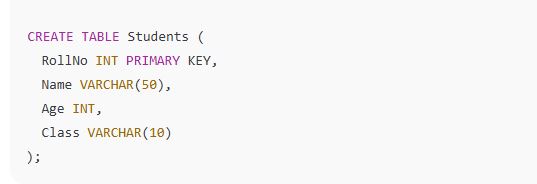
🔹 SQL Command:

🔍 Explanation:

  • CREATE TABLE Students: Creates a table named Students.

  • RollNo, Name, Age, Class: These are columns of the table.

  • INT, VARCHAR(50), etc., are data types.

  • PRIMARY KEY ensures RollNo is unique and cannot be null.

TRY THIS

4. Inserting Data into a Table

Once the table is created, you can add rows of data using the INSERT INTO statement.

🔹 SQL Command:

🔍 Explanation:

  • INSERT INTO Students (...) specifies the table and columns where data will go.

  • VALUES (...) provides the actual values for the columns.

  • This command adds one record (one row) into the Students table.

TRY THIS

🔄 Insert Multiple Rows:

TRY THIS

Making Simple Queries through Select Command

The SELECT command is used to fetch data from one or more tables in a database. It’s one of the most commonly used SQL statements for querying and displaying information.

🔹 1. Basic SELECT Query

Syntax:

Explanation:

  • This query displays specific columns from a table.

  • You can list one or more column names.

🔹 2. Selecting All Columns

Syntax:

Explanation:

  • The asterisk * means all columns.

  • This query fetches every column from the table.

Example:

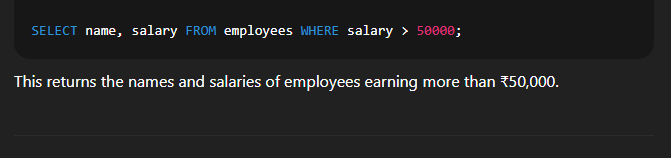
🔹 3. Using WHERE Clause to Filter Data

Syntax:

Explanation:

  • The WHERE clause is used to fetch only those records that meet a specified condition.

Example:

🔹 4. Using Aliases with AS Keyword

Syntax:

Explanation:

  • AS allows you to rename columns in the output for better readability.

Example:

🔹 5. Using DISTINCT to Avoid Duplicate Rows

Syntax:

Explanation:

  • DISTINCT filters out duplicate values in a column and shows only unique values.

Example:

🔹 6. Using ORDER BY to Sort the Output

Syntax:

Explanation:

  • ORDER BY arranges the output in ascending (ASC) or descending (DESC) order.

Example:

🔹 7. Using LIMIT to Restrict the Number of Rows

Syntax:

Explanation:

  • LIMIT restricts the number of rows displayed in the output.

Example:

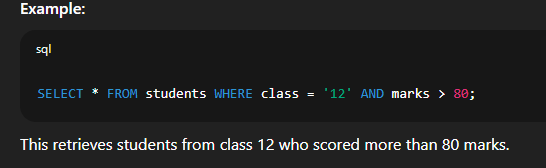
🔹 8. Combining Multiple Conditions with WHERE, AND, OR

Syntax:

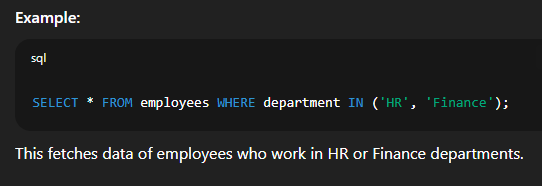
🔹 9. Using IN to Match Multiple Values

Syntax:

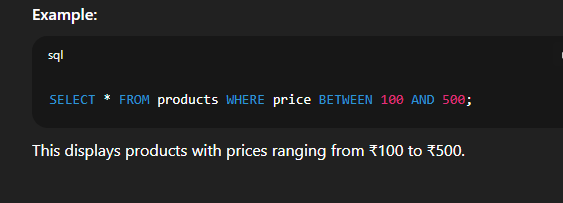
🔹 10. Using BETWEEN for Range Filtering

Syntax:

📘 Creating Table with SQL Constraints

When you create a table in SQL, you can apply constraints to control the validity, uniqueness, and integrity of the data stored in that table. Constraints help ensure that data entered into a table follows certain rules.

🔹 What is a SQL Constraint?

A constraint is a rule that limits the type of data that can be stored in a column. Constraints are applied at the column level or table level while creating or modifying tables.

🔹 Common SQL Constraints
Constraint Description
NOT NULL Prevents a column from having NULL values
UNIQUE Ensures all values in a column are different
PRIMARY KEY Uniquely identifies each row; combines UNIQUE and NOT NULL
FOREIGN KEY Ensures the value in one table matches a value in another table
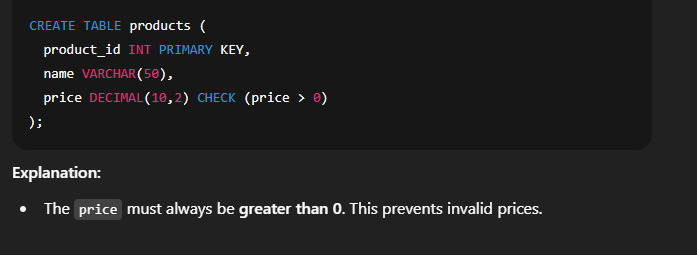
CHECK Validates values based on a condition
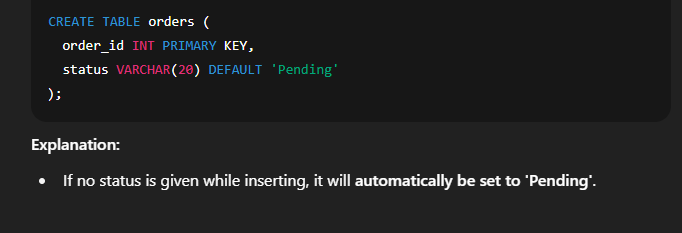
DEFAULT Assigns a default value if no value is provided

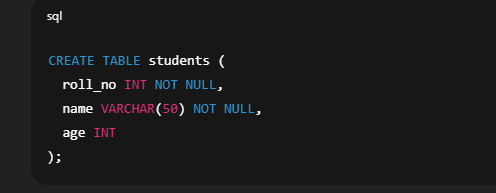
1. Creating Table with NOT NULL Constraint

Explanation:

  • The roll_no and name columns must have a value. They cannot be NULL.

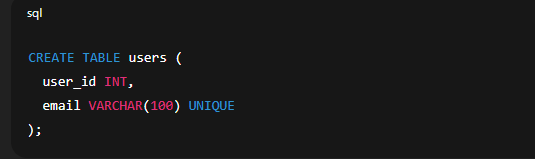
2. Creating Table with UNIQUE Constraint

Explanation:

  • The email column must contain unique values. Duplicate emails are not allowed.

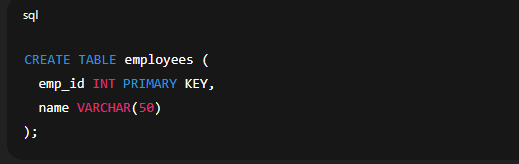
3. Creating Table with PRIMARY KEY Constraint

Explanation:

  • The emp_id column uniquely identifies each employee and cannot be NULL or duplicated.

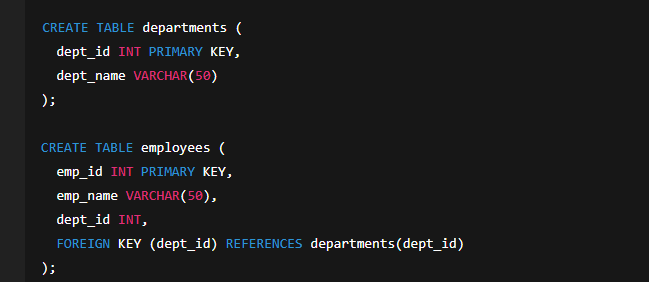
4. Creating Table with FOREIGN KEY Constraint

Explanation:

  • The dept_id in the employees table must match a valid dept_id in the departments table.

  • This ensures referential integrity between both tables.

5. Creating Table with CHECK Constraint

6. Creating Table with DEFAULT Constraint

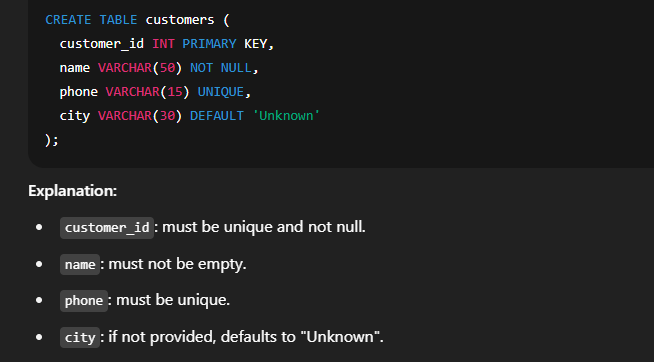
🔸 Combining Multiple Constraints

🔹 SQL Constraint Types Overview
Constraint Type Applies To Purpose
NOT NULL Column Prevents missing data
UNIQUE Column No duplicate values
PRIMARY KEY Column or multiple columns Unique + Not Null
FOREIGN KEY Column Ensures relationship with another table
CHECK Column or table Condition must be true
DEFAULT Column Supplies default value

📘 Inserting Data into Another Table in SQL

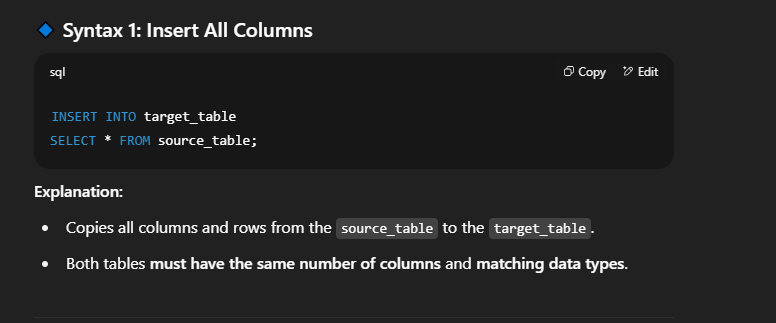
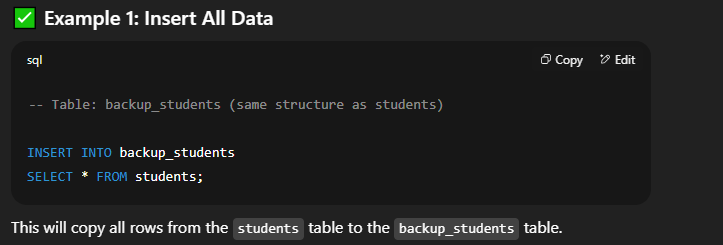
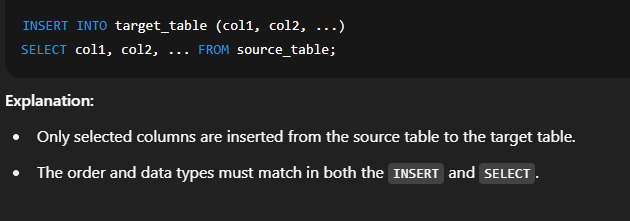
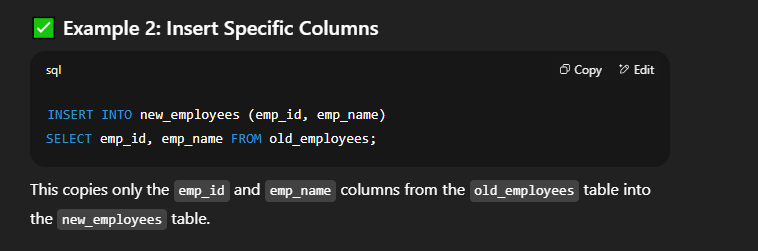
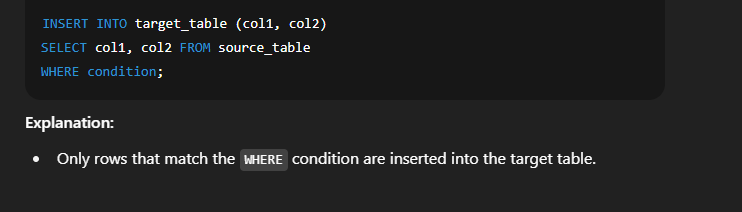
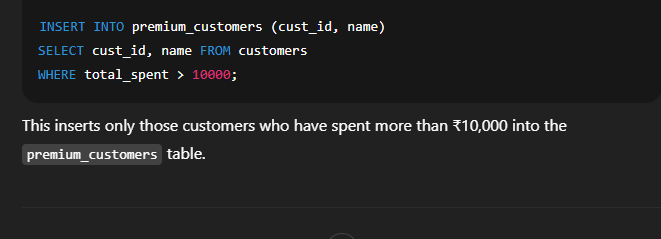
In SQL, you can copy data from one table to another using the INSERT INTO ... SELECT statement. This method is used to move or duplicate data between tables, especially when both tables have similar columns.

🔹 Syntax 2: Insert Selected Columns Only

🔹 Syntax 3: Insert with Conditions

🔸 Important Points to Remember

  1. ✅ Both tables should have compatible columns in type and order.

  2. ⚠️ NOT NULL, UNIQUE, or PRIMARY KEY constraints must be satisfied in the target table.

  3. 🔐 If the target table has extra columns with NOT NULL constraints, you must supply values using DEFAULT or in the INSERT query.

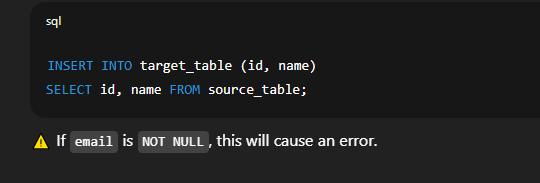
🔹 Example with Missing Columns (Error)

Suppose the target table has 3 columns (id, name, email), and you only insert 2 columns:

📘 Modifying Data in a Table in SQL

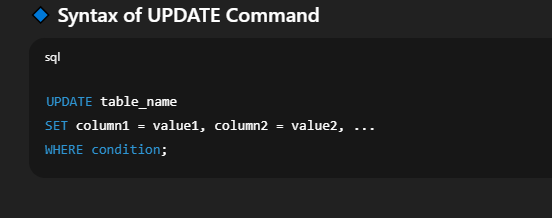
In SQL, we use the UPDATE command to change existing data in a table. This is useful when records need to be corrected, updated, or modified based on certain conditions.

🔍 Explanation of Syntax:

  • UPDATE: Specifies the table in which you want to make changes.

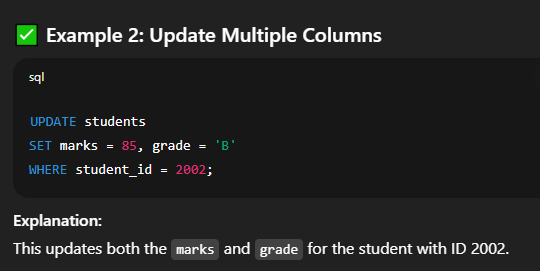
  • SET: Lists the column(s) you want to update with their new values.

  • WHERE: (Optional but important) Defines which rows should be updated.

⚠️ Without a WHERE clause, all rows in the table will be updated!

🔐 Important Tips and Warnings

 
⚠️ SQL UPDATE Tips & Warnings
Tip / Warning Description
✅ Use WHERE clause To avoid updating every row accidentally
🔄 Can use arithmetic Like SET quantity = quantity - 5
❗ Be cautious No undo command — always double-check your query
✅ Test on a backup Especially for bulk updates

📘 Modifying Data in a Table in SQL

In SQL, we use the UPDATE command to change existing data in a table. This is useful when records need to be corrected, updated, or modified based on certain conditions.

🔹 Syntax of UPDATE Command

 
UPDATE table_name SET column1 = value1, column2 = value2, ... WHERE condition;

🔍 Explanation of Syntax:

  • UPDATE: Specifies the table in which you want to make changes.

  • SET: Lists the column(s) you want to update with their new values.

  • WHERE: (Optional but important) Defines which rows should be updated.

⚠️ Without a WHERE clause, all rows in the table will be updated!

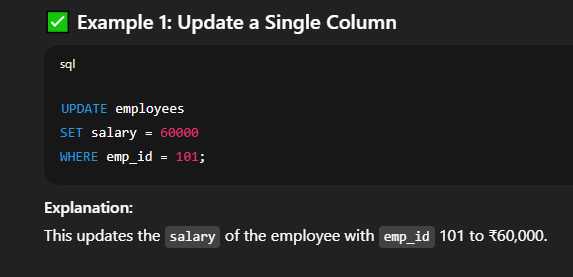
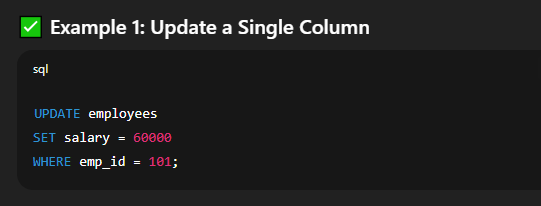
Explanation:
This updates the salary of the employee with emp_id 101 to ₹60,000.

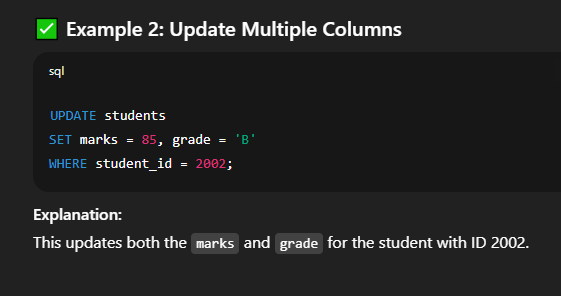
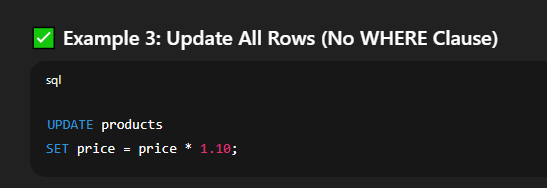
Explanation:
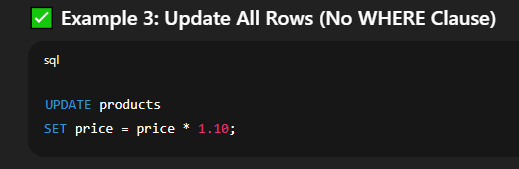
This increases the price of all products by 10%. Use this carefully, as it affects the entire table.

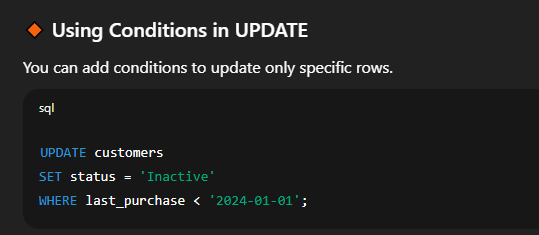
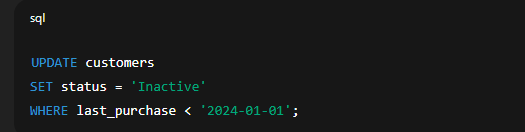
🔸 Using Conditions in UPDATE

You can add conditions to update only specific rows.

🔐 Important Tips and Warnings

Leave a Reply

Your email address will not be published. Required fields are marked *

sign up!

We’ll send you the hottest deals straight to your inbox so you’re always in on the best-kept software secrets.