Explain React Components in detail.
SOLUTION....
What are React Components?
React is a JavaScript library used for building user interfaces, and the foundation of React applications is components. A component in React is like a small, reusable piece of code that represents part of the user interface. Think of it as a building block. Just like in a house you use bricks repeatedly to construct walls, in React you use components to build pages and entire applications.
Components make code more organized, reusable, and easier to maintain. Instead of writing one long file that manages the whole user interface, React allows you to divide it into multiple components, where each one focuses on a specific part of the application.
Types of React Components
There are mainly two types of components in React:
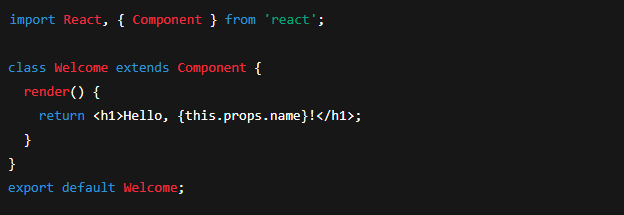
1. Class Components
These are ES6 classes that extend from
React.Component.They have access to lifecycle methods like
componentDidMount,componentDidUpdate, andcomponentWillUnmount.Class components use a
render()method, which returns the UI.They can hold and manage state (data that changes over time) and use
this.propsto access data passed from parent components.
Example:
2. Functional Components
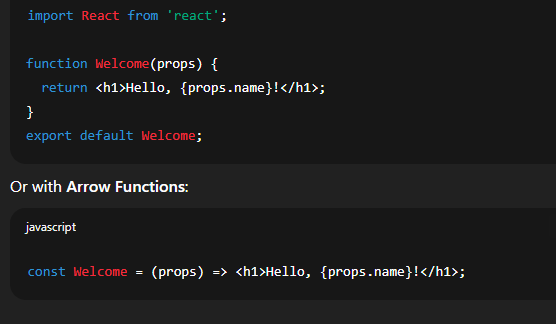
These are simple JavaScript functions that return JSX (the syntax that looks like HTML but is actually JavaScript).
Initially, functional components were stateless, but after the introduction of React Hooks, they can now use state and lifecycle features.
They are simpler and recommended in modern React development.
Example:
Core Concepts in React Components
1. Props (Properties)
Props are like arguments that you pass to functions.
They allow data to flow from a parent component to a child component.
Props are read-only, meaning a child component cannot modify the props it receives.
Example:

2. State
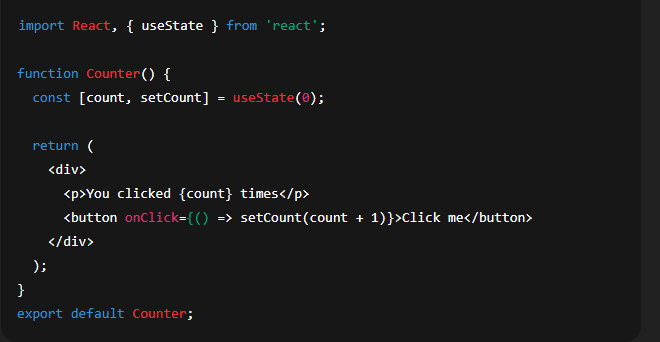
State is data managed within a component itself.
Unlike props, state can change over time (for example, a counter value).
In class components, state is managed using
this.stateand updated usingthis.setState().In functional components, state is managed using the
useStatehook.
Example with Hooks:
3. Lifecycle Methods
Lifecycle methods are only available in class components (but hooks like useEffect provide similar functionality in functional components).
They represent different phases of a component’s life:
Mounting → When the component is added to the DOM.
Updating → When the component is re-rendered due to changes in props or state.
Unmounting → When the component is removed from the DOM.
Example methods:
componentDidMount()→ Runs after the component is rendered.componentDidUpdate()→ Runs after updates.componentWillUnmount()→ Runs before the component is removed.
4. Hooks in Functional Components
Hooks bring lifecycle and state features to functional components. Some important hooks are:
useState→ Manages state.useEffect→ Handles side effects (like fetching data).useContext→ Manages global state without prop drilling.useReducer→ Advanced state management.
Advantages of Using Components
Reusability – The same component can be reused across different parts of the app.
Readability – Code is easier to understand because each part of the UI has its own component.
Separation of Concerns – UI is divided into smaller parts, making debugging and testing easier.
Faster Development – Pre-built components can speed up development.
Scalability – Large projects become manageable when divided into components.
Real-World Example
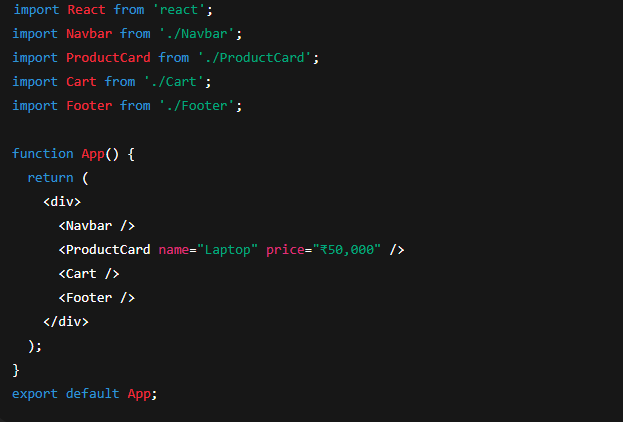
Imagine you are building an e-commerce website. Instead of writing everything in one file, you can create components like:
Navbar→ For the top navigation.ProductCard→ To display individual products.Cart→ To manage shopping cart items.Footer→ For website footer.
Then combine them in a parent component like App.js.