
INTRODUCTION TO PYTHON
notes
Python is a high-level, interpreted programming language known for its simplicity and readability. It is widely used in various fields such as web development, data science, artificial intelligence, automation, and software development. Python uses a clean and easy-to-understand syntax that emphasizes code readability, making it ideal for beginners and professionals alike.
✅ What is Python?
Python is an open-source, general-purpose programming language created by Guido van Rossum and first released in 1991. It supports multiple programming paradigms, including procedural, object-oriented, and functional programming. Python is known for its clean syntax, which closely resembles natural English, making it easier to learn and use.
Python is packed with powerful features that make it one of the most widely used programming languages in the world. Below are its key features explained in detail:
✅ 1. Simple and Easy to Learn
Python has a clean and readable syntax that resembles English, which makes it easy for beginners to learn and write code.
📌 Example:

✅ Example Code:
✅ 2. Interpreted Language
Python code is executed line-by-line by an interpreter, which simplifies debugging and testing. There’s no need to compile the code before running it.
✅ 3. High-Level Language
As a high-level language, Python abstracts away complex details of the computer hardware. You don’t need to manage memory or deal with low-level operations.
✅ 4. Cross-Platform Compatibility
Python is platform-independent. Code written on one operating system (like Windows) can easily run on others (like Linux or macOS) with little to no modification.
✅ 5. Extensive Standard Library
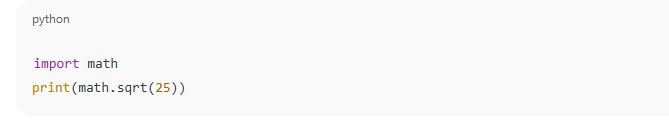
Python comes with a vast collection of built-in modules and functions that save time during development. These include modules for file handling, math operations, web services, databases, and more.
📌 Example:
✅ 6. Object-Oriented and Procedural Support
Python supports both object-oriented programming (OOP) and procedural programming. This flexibility allows developers to organize code effectively using classes and objects or through functions.
✅ 7. Dynamic Typing
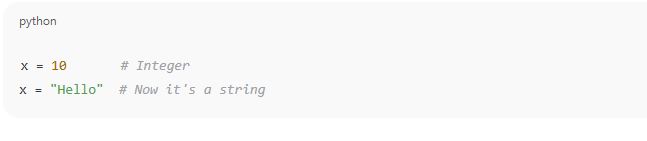
You don’t need to declare variable types in Python. The interpreter automatically assigns the data type based on the value.
✅ 8. Large Community Support
Python has a massive global community. This means abundant tutorials, forums, open-source tools, and active development support.
✅ 9. Embeddable and Extensible
Python can be integrated with other programming languages like C, C++, or Java. It can also be embedded in large software systems as a scripting interface.
✅ 10. Ideal for Rapid Development
Due to its simplicity and rich set of libraries, Python allows faster development and prototyping of applications.
✅ Popular Applications of Python:
Web Development: Using frameworks like Django, Flask
Data Science & Analysis: Using tools like NumPy, Pandas, Matplotlib
Machine Learning & AI: Libraries like Scikit-learn, TensorFlow, PyTorch
Automation/Scripting: Writing scripts to automate repetitive tasks
Game Development: Using libraries like Pygame
Desktop Applications: GUI development using Tkinter, PyQt
✅ Why Learn Python?
It is beginner-friendly and widely adopted in industry.
Used by tech giants like Google, Facebook, NASA, and Netflix.
Highly in demand for careers in data science, AI, and web development.
Working with Python
Working with Python involves writing and executing Python programs to perform various tasks such as calculations, automation, data processing, and software development. It includes setting up the Python environment, using editors or IDEs, understanding basic syntax, writing code, running scripts, and using libraries to solve problems effectively.
When you start working with Python, you’re stepping into a world of simple, clean, and powerful programming. Here are the core aspects involved in working with Python:
✅ 1. Installing Python
To begin working with Python, the first step is to install it from the official website: https://www.python.org. Most systems allow you to choose the version (preferably Python 3.x) based on your needs.
✅ 2. Setting Up the Environment
After installation, you can write and execute Python code using:
IDLE (Python’s built-in editor)
Text Editors (e.g., Notepad++, Sublime Text, VS Code)
Integrated Development Environments (IDEs) like PyCharm, Jupyter Notebook or IDLE.
✅ 3. Writing Your First Python Program
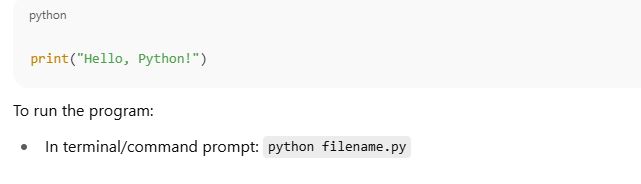
A simple Python program can be written in a file with .py extension or directly in an interactive shell.
📌 Example (Hello World):
✅ 4. Understanding Python Syntax
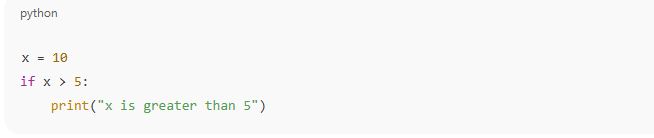
Python uses indentation instead of curly braces to define blocks of code. This makes the code visually clean and structured.
📌 Example:
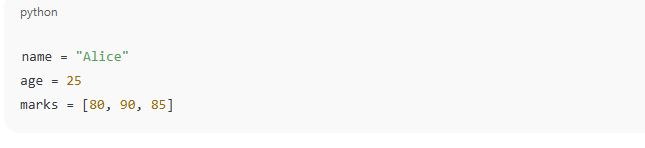
✅ 5. Using Variables and Data Types
Python supports various data types like integers, floats, strings, lists, dictionaries, and more.
📌 Example:
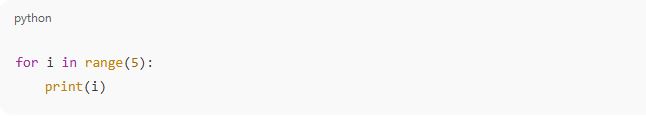
✅ 6. Control Structures
You can use if, else, for, and while to control the flow of programs.
📌 Example:
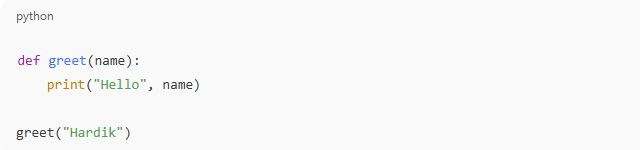
✅ 7. Working with Functions
Functions help in writing reusable and modular code.
📌 Example:
✅ 8. Using Python Libraries
Python has built-in and external libraries for a wide range of tasks.
📌 Example (Using math library):

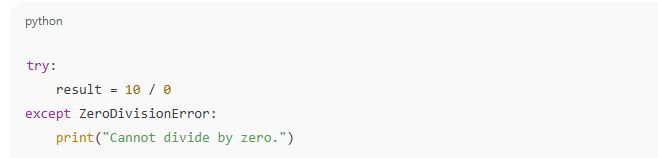
✅ 9. Debugging and Testing
Python provides tools like try-except blocks for handling errors and debugging programs.
📌 Example:
✅ 10. Saving and Running Scripts
Save your code with .py extension and run it via terminal or an IDE. You can also create full applications, scripts, and automations using Python.
Execution Modes in Python
Python supports multiple execution modes to run programs. The two main modes are Interactive Mode and Script Mode. Interactive mode is used for quick testing and one-line commands, while Script mode is used to write and execute entire programs saved in .py files. These modes provide flexibility for both learning and developing real-world applications.
🔹 Detailed Explanation: Execution Modes in Python
When working with Python, you can execute your code in different ways depending on the purpose and environment. Python mainly supports two execution modes:
✅ 1. Interactive Mode
🔸 Description:
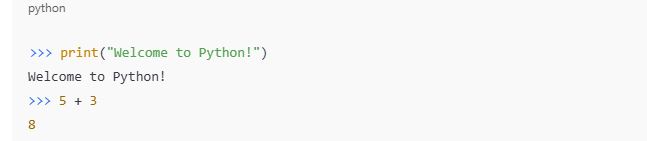
Interactive mode allows you to enter and execute Python commands line by line in a Python shell or terminal. It is useful for quick testing, experimenting, and learning basic Python syntax.
🔸 How to Access:
Open terminal or command prompt.
Type
pythonorpython3and press Enter.You’ll see the
>>>prompt, indicating that the interpreter is ready.
🔸 Example:
🔸 Use Cases:
Quick calculations or debugging
Testing functions or expressions
Learning Python syntax
✅ 2. Script Mode
🔸 Description:
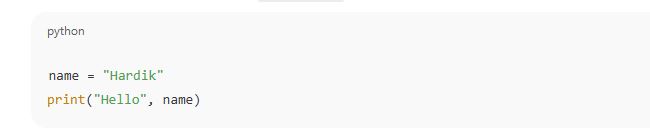
Script mode allows you to write a complete program in a text file with a .py extension and then execute it as a whole. It is suitable for writing larger programs and building applications.
🔸 How to Run:
Open any code editor or IDE (like VS Code, IDLE, PyCharm).
Write your Python code and save the file, for example:
example.pyOpen the terminal/command prompt.
Run the script using:

🔸 Example Code (in file greet.py):
🔸 Use Cases:
Writing full programs
Developing projects and automation scripts
Creating reusable code
Python keywords are predefined, reserved words in the Python language that have special meanings. These words are part of the core syntax and cannot be used as variable names, function names, or identifiers. Examples include if, else, for, while, def, and class.
🔹 Detailed Explanation: Python Keywords
✅ What are Python Keywords?
In Python, keywords are special words that are reserved by the language. These keywords serve specific purposes and help define the structure and logic of Python programs. Since they are built into the language, you cannot use them for naming variables, functions, or classes.
They are case-sensitive, meaning True is a keyword, but true is not.
| Keyword | Purpose |
|---|---|
| if, else, elif | Used for conditional branching |
| for, while | Looping or iteration |
| break, continue, pass | Control flow within loops |
| def | Defines a function |
| return | Returns a value from a function |
| import, from, as | Importing modules or specific functions |
| class | Declares a class |
| try, except, finally, raise | Error and exception handling |
| True, False, None | Special constant values |
| in, not, and, or, is | Logical and membership operations |
| global, nonlocal | Variable scope definition |
| with | Used for context managers (e.g., file handling) |
| lambda | Defines anonymous functions |
| yield | Used with generators |
✅ Important Notes:
Python has around 35–36 keywords (number may vary slightly depending on version).
To check keywords in your version, use this code:

✅ Why Are Keywords Important?
They define the rules and grammar of Python.
They help programmers write clear and logical code.
Misusing keywords as identifiers leads to syntax errors.
Explanation: Identifiers in Python
Identifiers are the names used in Python to identify variables, functions, classes, modules, and other objects. They are user-defined names that help in referring to data and operations in a program. Identifiers must follow specific rules, such as not starting with a digit and avoiding reserved keywords.
🔹 Detailed Explanation: Identifiers in Python
✅ What are Identifiers?
In Python, an identifier is the name given to entities like:
Variables
Functions
Classes
Modules
Objects
These names help us to refer to data or code blocks throughout a program.
📌 Example:
✅ Rules for Naming Identifiers:
Allowed Characters:
Letters (A–Z, a–z)
Digits (0–9)
Underscore (
_)
<br>🔸 Example:student_name,age1
Cannot Start with a Digit:
❌ Invalid:
2name = "John"✅ Valid:
name2 = "John"
No Special Symbols Allowed:
❌ Invalid:
my-name,user@id,price$
No Python Keywords:
You cannot use reserved keywords like
for,if,classas identifiers.❌ Invalid:
for = 10
Case-Sensitive:
Nameandnameare different identifiers in Python.✅ Valid:
Name = "A"andname = "B"
✅ Types of Identifiers:
Variable Identifier:

2. Function Identifier:

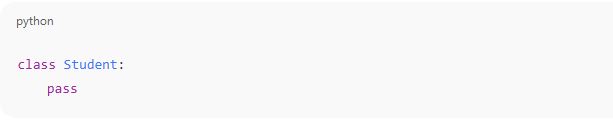
3. Class Identifier:
✅ Best Practices for Naming Identifiers:
Use meaningful names:
marks,student_nameinstead ofx,yUse lowercase letters for variables and functions
Use capitalized words for class names (
StudentRecord)Use underscores to separate words in long names:
total_marks_obtained
Variables in Python
Variables in Python are containers used to store data values. They act as labels for data stored in memory. You can assign values to variables using the = operator, and the type of data stored (like numbers, text, lists) is automatically determined. Variables make it easier to work with and manipulate data in programs.
🔹 Detailed Explanation: Variables in Python
✅ What is a Variable?
A variable is a named reference to a value stored in the computer’s memory. It allows you to store, retrieve, and manipulate data in a program by using that name.
📌 Example:

✅ Key Characteristics of Python Variables:
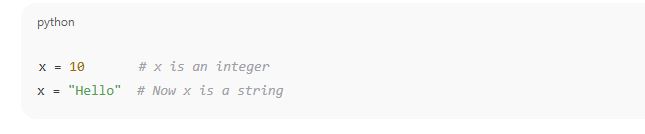
Dynamic Typing
You don’t need to declare the type of a variable. Python figures it out based on the value assigned
2. No Explicit Declaration Required
You create a variable the moment you assign it a value.

3. Case Sensitive
Variable names like value, Value, and VALUE are all treated as different variables.
4. Memory Allocation
Python automatically handles memory allocation and garbage collection, so you don’t need to worry about managing memory manually.
✅ Rules for Naming Variables:
Can include letters (A–Z, a–z), digits (0–9), and underscores (_)
Must start with a letter or underscore, not a digit
Cannot use Python keywords (like
if,while,class, etc.)Should be meaningful and descriptive
✅ Multiple Assignments in One Line:

Explanation: Comments in Python
Comments in Python are notes written in the code that are ignored by the interpreter. They are used to explain the purpose, logic, or function of the code, making it easier for developers to understand or review programs. Python supports single-line and multi-line comments using the # symbol and triple quotes (''' or """).
🔹 Detailed Explanation: Comments in Python
✅ What Are Comments?
Comments are non-executable statements used to describe the code. They serve as documentation and help others (or yourself later) understand what a specific part of the code is doing.
Python ignores comments during execution, so they do not affect the output of the program.
✅ Types of Comments in Python
🔸 1. Single-Line Comments
These begin with a # symbol. Anything after # on the same line is treated as a comment.
📌 Example:

🔸 2. Multi-Line Comments
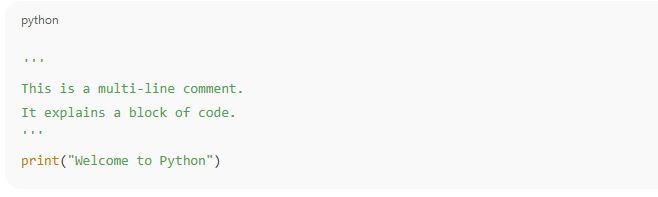
Python does not have a special syntax for multi-line comments, but you can use triple quotes (”’ or “””) as a workaround. Although technically treated as multi-line strings, they can be used to write multi-line comments when not assigned to a variable.
📌 Example:
✅ Why Are Comments Important?
Improve Code Readability – Helps others (or yourself) understand complex logic.
Debugging Aid – You can temporarily disable lines of code by commenting them.
Documentation – Explains the purpose of functions, variables, or program flow.
Team Collaboration – Essential in group projects to make code maintainable.
✅ Best Practices for Writing Comments
Keep comments short and relevant.
Avoid stating the obvious:

Use comments to explain why something is done, not what is done, if it’s already clear from the code.
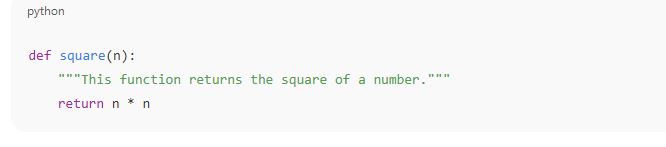
Use docstrings for documenting functions and classes (not for general comments).
📌 Example (Function Docstring):
Data Types in Python
Data types in Python define the kind of value a variable can hold. Common data types include integers, floating-point numbers, strings, booleans, lists, tuples, sets, and dictionaries. Python automatically assigns the appropriate data type when a value is stored in a variable. Understanding data types is essential for performing operations and managing data correctly.
🔹 Detailed Explanation: Data Types in Python
✅ What Are Data Types?
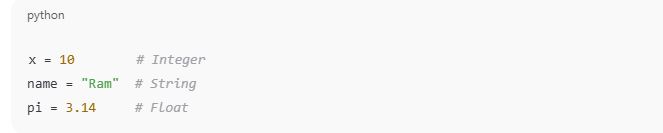
In Python, every value has a data type, which tells the interpreter what kind of value it is and what operations can be performed on it. Python is dynamically typed, meaning you don’t have to declare the data type explicitly—it is inferred automatically when the value is assigned.
📌 Example:
| Data Type | Description | Example |
|---|---|---|
| int | Whole numbers | age = 25 |
| float | Decimal numbers | price = 99.5 |
| str | Text or characters | name = "Alice" |
| bool | True/False values | is_valid = True |
| list | Ordered, changeable collection | fruits = ["apple", "banana"] |
| tuple | Ordered, unchangeable collection | point = (4, 5) |
| set | Unordered, unique values | colors = {"red", "blue"} |
| dict | Key-value pairs | student = {"name": "Raj", "age": 20} |
| NoneType | Represents no value | data = None |
✅ Examples of Each Data Type:
1. Integer (int)

2. Float (float)

3. String (str)

4. Boolean (bool)

5. List

6. Tuple

7. Set

8. Dictionary

9. NoneType

Operators in Python
Operators are special symbols or keywords in Python used to perform operations on variables and values. They are the foundation of most expressions and logic in a program. Python supports several types of operators such as arithmetic, comparison, assignment, logical, bitwise, membership, and identity operators.
.🔹 Detailed Explanation: Operators in Python
✅ What are Operators?
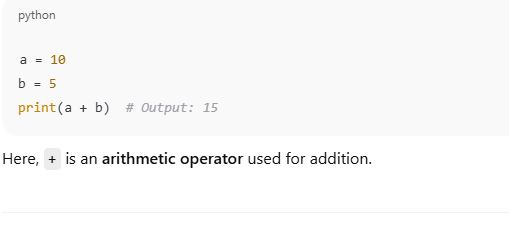
In Python, operators are used to perform actions on variables and data. They help in tasks like mathematical calculations, comparisons, assigning values, combining logical conditions, and more.
📌 Example:
✅ Types of Operators in Python:
🔸 1. Arithmetic Operators
Used for mathematical calculations.
| Operator | Description | Example | Result |
|---|---|---|---|
| + | Addition | 10 + 5 | 15 |
| - | Subtraction | 10 - 5 | 5 |
| * | Multiplication | 10 * 5 | 50 |
| / | Division | 10 / 5 | 2.0 |
| // | Floor Division | 10 // 3 | 3 |
| % | Modulus (Remainder) | 10 % 3 | 1 |
| ** | Exponentiation | 2 ** 3 | 8 |
🔸 2. Assignment Operators
Used to assign values to variables.
| Operator | Example | Meaning |
|---|---|---|
| = | x = 5 | Assign 5 to x |
| += | x += 3 | x = x + 3 |
| -= | x -= 2 | x = x - 2 |
| *= | x *= 4 | x = x * 4 |
| /= | x /= 2 | x = x / 2 |
🔸 3. Comparison (Relational) Operators
Used to compare values and return boolean results (True or False).
| Operator | Meaning | Example |
|---|---|---|
| == | Equal to | a == b |
| != | Not equal to | a != b |
| > | Greater than | a > b |
| < | Less than | a < b |
| >= | Greater or equal to | a >= b |
| <= | Less or equal to | a <= b |
🔸 4. Logical Operators
Used to combine conditional statements.
| Operator | Description | Example |
|---|---|---|
| and | True if both conditions are True | a > 5 and b < 10 |
| or | True if at least one condition is True | a > 5 or b < 3 |
| not | Reverses the result | not(a > 5) |
🔸 5. Bitwise Operators
Operate on bits (binary digits) of integers.
| Operator | Description | Example |
|---|---|---|
| & | AND | a & b |
| | | OR | a | b |
| ^ | XOR | a ^ b |
| ~ | NOT | ~a |
| << | Left Shift | a << 2 |
| >> | Right Shift | a >> 2 |
🔸 6. Membership Operators
Check if a value is part of a sequence like a list, string, or tuple.
| Operator | Description | Example |
|---|---|---|
| in | True if value exists | 'a' in 'apple' |
| not in | True if not exists | 'b' not in 'apple' |
🔸 7. Identity Operators
Check whether two variables refer to the same object.
| Operator | Description | Example |
|---|---|---|
| is | True if same object | a is b |
| is not | True if not the same object | a is not b |
✅ Why Are Operators Important?
Allow you to perform operations on data.
Essential for logic building and calculations.
Used in loops, conditions, functions, and expressions.
Statements in Python
In Python, a statement is a single line of code that performs an action. It can be as simple as assigning a value or as complex as a loop or function call. Statements are the building blocks of any Python program and are executed in the order in which they appear unless control statements change the flow.
What is a Statement?
A statement in Python is an instruction that the Python interpreter can execute. When you write a line of code and run it, that line is typically considered a statement.
Python statements help define how the program runs, processes data, and makes decisions.
 Types of Statements in Python:
1. Expression Statement
2. Assignment Statement
3. Conditional Statement
4. Looping Statements
5. Function Definition Statement
6. Import Statement
7. Pass Statement
8. Break and Continue Statements
✅ Why Are Statements Important?
They control how a program behaves and executes.
Help organize code into logical sections.
Enable decision-making, repetition, and modularity in Python programs.
🔹 Input and Output in Python
In Python, input allows the user to enter data into the program, and output lets the program display information to the user. The input() function is used to take input from the keyboard, while the print() function is used to show output on the screen.
🔹 Detailed Explanation: Input and Output in Python
✅ 1. Output in Python
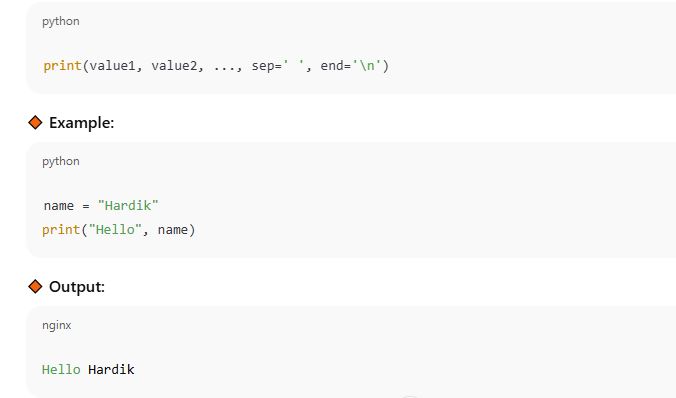
Python provides the built-in print() function to display messages, variable values, or results on the screen.
🔸 Syntax:
🔸 Parameters in print():
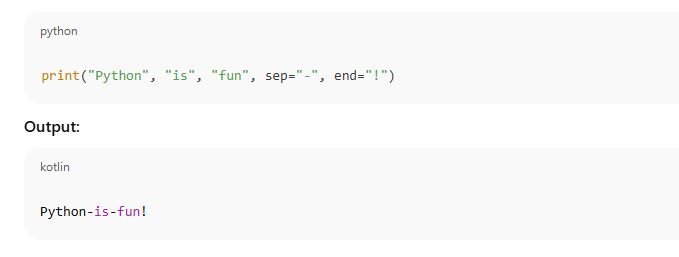
sep: Defines the separator between multiple values (default is a space).end: Defines what to print at the end (default is newline\n).
Example:
✅ 2. Input in Python
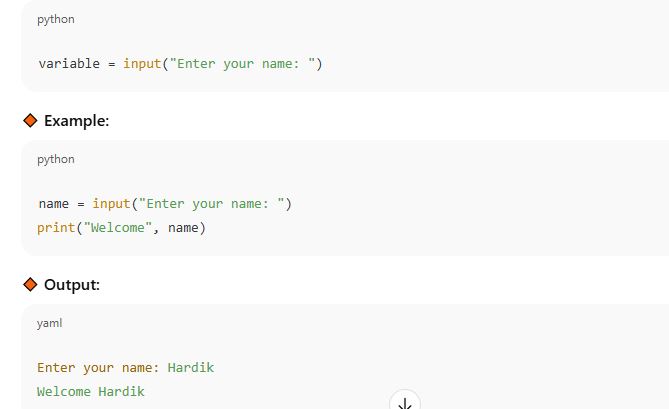
Python uses the input() function to receive input from the user as a string.
🔸 Syntax:
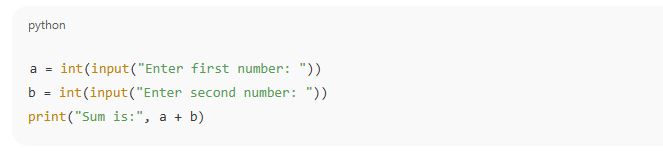
✅ Combining Input and Output
You can combine both functions to interact with the user dynamically.
Example:
✅ Why Is Input/Output Important?
Enables interaction between the user and the program
Used to collect dynamic data at runtime
Essential for user-friendly applications