Time and Date Function
String Function
Overview
- Â
Time and Date Function
Time and Date functions
1. SYSDATE :-Â
- Purpose: Returns the current system date and time.
- Syntax: SYSDATE
- Example :-select sysdate as result from dual;
TRY YOURSELF
Time and Date functions
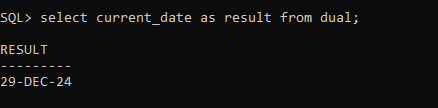
2. CURRENT_DATE :-Â
- Purpose: Returns the current date and time in the session’s time zone.
- Syntax: CURRENT_DATE
- Example :-Â select current_date as result from dual;
TRY YOURSELF
Time and Date functions
3. SYSTIMESTAMP :-Â
- Purpose:Â Returns the current system date and time, including time zone information.
- Syntax:Â SYSTIMESTAMP
- Example :-Â select systimestamp as result from dual;
TRY YOURSELF
Time and Date functions
4. ADD_MONTHS :-Â
- Purpose:Â Adds a specified number of months to a date.
- Syntax:Â ADD_MONTHS(date, number_of_months)
- Example :-Â select add_months(sysdate,2) as result from dual;
TRY YOURSELF
Time and Date functions
5. LAST_DAY :-Â
- Purpose:-Â Â Returns the last day of the month for a specified date.
- Syntax:-Â Â LAST_DAY(date)
- Example :-Â select last_day(sysdate) as result from dual;
TRY YOURSELF
Time and Date functions
6. NEXT_DAY :-Â
- Purpose:-Â Returns the next date after the given date that falls on a specified weekday.
- Syntax:-Â Â NEXT_DAY(date, ‘weekday’)
- Example :-Â Â Â select next_day(sysdate,’Monday’) as result from dual;
TRY YOURSELF
Time and Date functions
7. MONTHS_BETWEEN :-Â
- Purpose:-Â Â Calculates the number of months between two dates.
- Syntax:-Â Â MONTHS_BETWEEN(date1, date2)
- Example :-Â Â Â select months_between(sysdate, to_date(’01-jan-2026′,’DD-MM-YYYY’))as result from dual;
TRY YOURSELF
Time and Date functions
8. TO_DATE :-Â
- Purpose:Â Converts a string into a date using a specified format.
- Syntax:Â TO_DATE(string, format)
- Example :-Â Â Â select to_date(’25-DEC-2024′,’DD-MM-YYYY’) as result from dual;