
Unit-1: Introduction to SQLite:
Index
1.1 SQLite advantages, features and Fundamentals:
1.1.1 SQLite datatype : ( Dynamic type, SQLite manifest typing &
type affinity) (NULL, INTEGER, REAL, TEXT, BLOB)
1.1.2 Transaction, Rollback, Commit
1.2 Data Filtering and Triggers
1.2.1 Filtering: Distinct, where, between, in, like, Union, intersect,
Except, Limit, IS NULL
1.2.2 Having, Group by, Order by, Conditional Logic (CASE)
1.3 SQLite joins: Inner, left, cross, self, Full outer joins.
1.4 SQLite Trigger:
1.4.1 Concepts of Trigger, Before and After trigger (on Insert, Update,
Delete)
1.4.2 Create, Drop trigger, Disable and Enable trigger
NOTES
1.1 SQLite: Advantages, Features, and Fundamentals
✅ Introduction to SQLite
SQLite is a lightweight, serverless, self-contained SQL database engine that is widely used in embedded systems, mobile apps, web browsers, and standalone applications. It is known for its simplicity, reliability, and minimal configuration requirements. Unlike traditional relational database systems like MySQL or PostgreSQL, SQLite does not run as a separate server process but integrates directly into the application.
⭐ Fundamentals of SQLite
Embedded Database:
SQLite is embedded within the application. It stores the entire database (including tables, indexes, and data) in a single file on disk.Zero Configuration:
No need to install, configure, or manage a separate server. It works out of the box with minimal setup.SQL Compatible:
Supports most of the SQL-92 standard including data definition (DDL), data manipulation (DML), and query operations.Cross-Platform:
Compatible with various platforms like Windows, macOS, Linux, iOS, and Android.File-Based Storage:
The entire database is stored in a single.sqliteor.dbfile, making it easy to move or back up.
| 💡 Feature | Description |
|---|---|
| Lightweight | Minimal disk and memory usage. Ideal for mobile and embedded environments. |
| Serverless | No separate server process. All interactions happen through the application. |
| Self-Contained | No external dependencies. Everything is contained in a single library. |
| Transactional | Fully supports ACID transactions, even after crashes or power loss. |
| Reliable | Extensively tested and used in production apps like Firefox and WhatsApp. |
| Readable File Format | Database files are cross-platform and easy to transfer or open. |
| Concurrent Reads | Supports multiple readers; write access is serialized. |
| Public Domain | SQLite is open source and free for all uses, even commercial ones. |
🏆 Advantages of SQLite
Ease of Use
No installation or administration required. Perfect for beginners and developers looking for a simple database solution.Performance
Very fast for smaller applications or apps that don’t need concurrent heavy writes.Portability
Since the entire database is stored in a single file, it can be easily copied or moved to other systems.Low Resource Consumption
Ideal for devices with limited CPU, memory, or storage, such as IoT devices or mobile phones.Built-In Support in Programming Languages
Native support in languages like Python (sqlite3module), PHP, Java (via JDBC), C/C++, etc.Data Integrity
Ensures data is safely stored and retrieved with full transactional support.No Licensing Worries
Released in the public domain—freely usable without licensing constraints.
📌 When to Use SQLite
Mobile Applications (e.g., Android, iOS apps)
Desktop Software (e.g., browsers, email clients)
Embedded Systems (e.g., smart TVs, GPS devices)
Lightweight Web Applications
Testing and Prototyping SQL queries or database features
❗ Limitations of SQLite
Not suitable for high-concurrency environments with frequent writes.
Limited support for complex user access control and stored procedures.
Best for smaller-scale applications (typically under a few GB of data).
1.2 SQLite Data Types
SQLite uses a unique and flexible approach to data types that differs from many other relational database systems. It relies on a concept called manifest typing and supports dynamic typing for its values.
✅ 1. Dynamic Typing in SQLite
Unlike most traditional databases that enforce a strict data type for each column, SQLite follows dynamic typing. This means that:
The type of a value is determined at runtime.
A column may store different data types in different rows.
Example: A column defined as
INTEGERcan still hold a text or real value if inserted.
Example:

🧠 2. Manifest Typing in SQLite
SQLite uses manifest typing instead of strict type enforcement. This means:
Columns have a declared type (manifest), but the database engine does not strictly enforce it.
The declared type is used to determine the type affinity of the column (explained below).
Actual values stored can be of any storage class.
In other words, the type declaration is a suggestion, not a rule.
📌 3. Type Affinity in SQLite
SQLite assigns a type affinity to each column based on its declared type. This helps SQLite decide how to store and compare the data.
There are five type affinities:
| Affinity | Description |
|---|---|
| TEXT | Values are stored as strings using UTF-8 or UTF-16. |
| NUMERIC | Values are stored as INTEGER or REAL when appropriate. |
| INTEGER | Values are stored as integers. |
| REAL | Values are stored as floating-point numbers. |
| BLOB | Values are stored exactly as they are, without any conversion. |
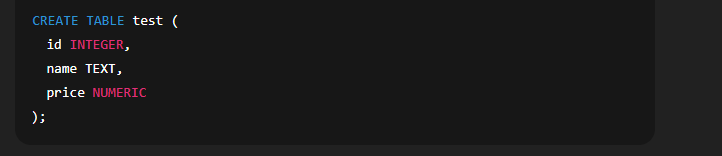
Rules for determining affinity from column type declaration:
If type contains “INT” →
INTEGERaffinityIf type contains “CHAR”, “CLOB”, or “TEXT” →
TEXTaffinityIf type contains “BLOB” or no type is specified →
BLOBaffinityIf type contains “REAL”, “FLOA”, or “DOUB” →
REALaffinityOtherwise →
NUMERICaffinity
🧾 4. SQLite Storage Classes (Core Data Types)
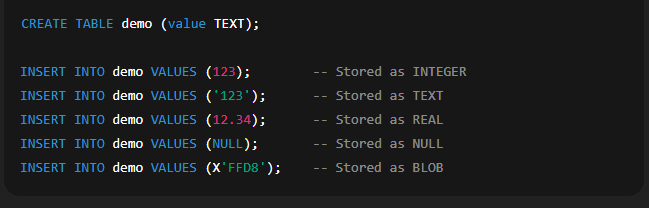
Internally, SQLite uses only five storage classes to store data in any table, regardless of the declared type.
| Storage Class | Description |
|---|---|
| NULL | Represents a missing or undefined value. |
| INTEGER | A signed whole number stored in 1 to 8 bytes. |
| REAL | A floating-point number (IEEE 8-byte format). |
| TEXT | A string of characters stored using UTF-8 or UTF-16. |
| BLOB | Binary Large Object. Stored exactly as input with no encoding. |
Important Notes:
SQLite automatically converts values to one of these five types.
The conversion depends on the value’s format and the column’s type affinity.
⚖️ Advantages of SQLite’s Typing System
Flexibility in storing different types of data in the same column.
Ease of use in rapid application development and prototyping.
Portability of data with fewer restrictions.
❗ Caution While Using SQLite Types
SQLite does not enforce strict data typing, which may lead to inconsistencies if not handled properly in application logic.
Ensure proper validation and conversion at the application level when needed.
1.12 Transaction, Rollback, Commit
Transaction Control Commands in SQLite
SQLite (and SQL in general) provides three primary commands to manage transactions:
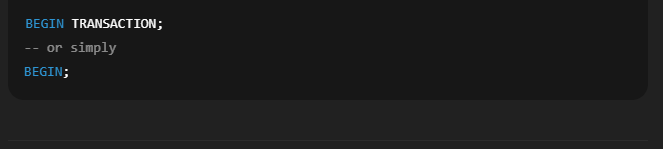
🔹 1. BEGIN TRANSACTION
Used to start a new transaction. This tells SQLite to temporarily hold changes in memory until the transaction is either committed or rolled back.
Syntax:
🔹 2. COMMIT
The COMMIT command permanently saves all changes made during the current transaction to the database. Once committed, the changes cannot be undone.
Syntax:
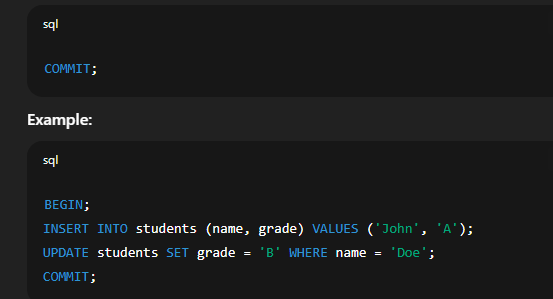
Here, both SQL statements are executed as part of one transaction. They will only be saved if COMMIT is successfully executed.
🔹 3. ROLLBACK
The ROLLBACK command undoes all changes made in the current transaction. It is useful when an error occurs, and you want to revert the database to its original state before the transaction started.
Syntax:
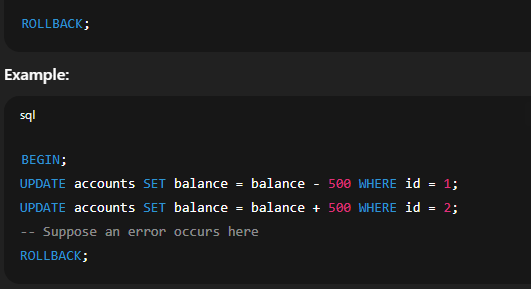
Here, if an error is detected after deducting the amount from Account 1, ROLLBACK ensures that the database is returned to the original state, as if no operation occurred.
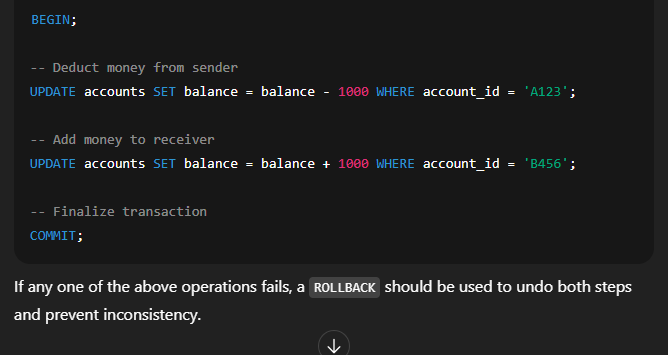
If any one of the above operations fails, a ROLLBACK should be used to undo both steps and prevent inconsistency.
⚠️ Auto-Commit Mode in SQLite
SQLite automatically commits changes after each individual SQL statement unless explicitly wrapped in a
BEGIN...COMMITblock.If you don’t use
BEGIN, each change is saved immediately.To gain full control, use transactions manually for grouped operations.
✅ Benefits of Using Transactions
Maintains data accuracy during multiple operations.
Prevents partial updates or data corruption during failures.
Allows error recovery using ROLLBACK.
Helps maintain logical consistency especially in complex operations.
1.2 Data Filtering and Triggers in SQLite
✅ Part 1: Data Filtering in SQLite
Data filtering refers to the process of retrieving specific data from a database that meets certain conditions. In SQLite (and SQL in general), data filtering is commonly done using the SELECT statement with conditional clauses like WHERE, LIKE, BETWEEN, IN, and more.
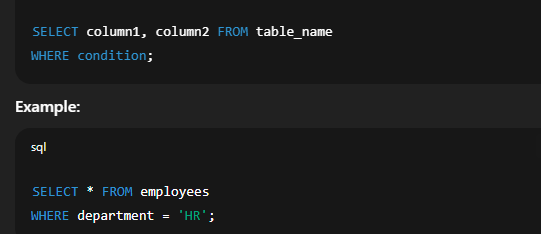
📌 1. WHERE Clause
Used to filter records based on a condition.
Syntax:
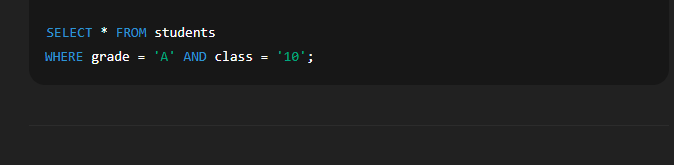
📌 2. Logical Operators
Used to combine multiple conditions:
AND: All conditions must be trueOR: At least one condition must be trueNOT: Reverses a condition
Example:
📌 3. BETWEEN Operator
Filters values within a specific range (inclusive).
Example:

📌 4. LIKE Operator
Used for pattern matching using wildcards:
%= zero or more characters_= exactly one character
Example:

📌 5. IN Operator
Checks if a value matches any value in a given list.
Example:

📌 6. IS NULL / IS NOT NULL
Filters records with missing values.
Example:

Part 2: Triggers in SQLite
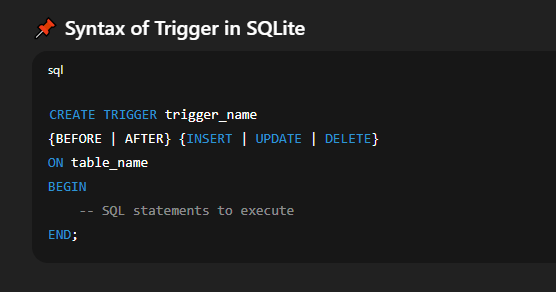
A trigger is a database object that automatically executes a specified action in response to certain events like INSERT, UPDATE, or DELETE on a table.
Triggers help automate tasks and enforce business rules within the database.
🧠 Why Use Triggers?
To automatically update other tables
To maintain audit trails (e.g., logging changes)
To prevent invalid data operations
To enforce complex constraints
🔹 Types of Triggers in SQLite
BEFORE Trigger: Executes before the triggering action occurs.
AFTER Trigger: Executes after the triggering action occurs.
🔹 Trigger Events
INSERT: Triggered when new data is insertedUPDATE: Triggered when existing data is modifiedDELETE: Triggered when data is removed
✅ Trigger Access to Values
NEW.column_name: Refers to the new value (used in INSERT and UPDATE).OLD.column_name: Refers to the existing value (used in UPDATE and DELETE).
⚠️ Points to Remember about Triggers
Triggers run automatically—no manual execution is needed.
They help in maintaining data consistency without user intervention.
Recursive or nested triggers are not supported in SQLite.
Triggers can impact performance if misused.
✅ Data Filtering in SQLite
Filtering is an essential part of SQL that helps in retrieving only the relevant data from large tables. SQLite provides various filtering clauses and operators to refine query results based on conditions or logical rules.
🔹 1. DISTINCT
The DISTINCT keyword is used to eliminate duplicate values from the result set of a query.
Syntax:
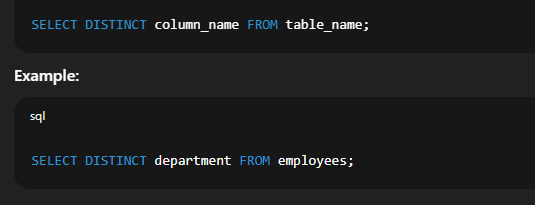
Returns each department only once, even if multiple employees belong to the same department.
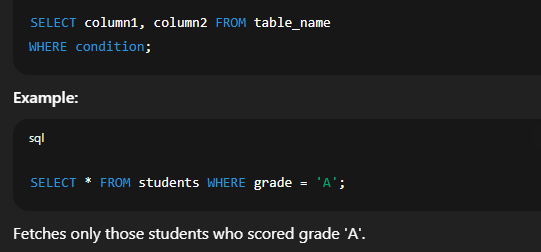
🔹 2. WHERE
The WHERE clause filters records based on a given condition.
Syntax:
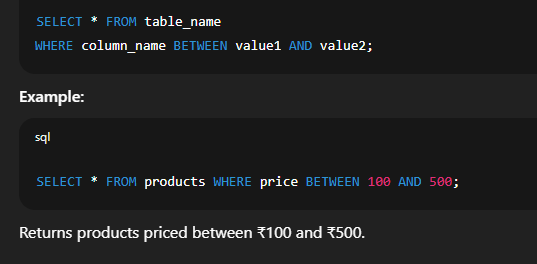
🔹 3. BETWEEN
The BETWEEN operator filters data that falls within a specific range (inclusive of the boundary values).
Syntax:
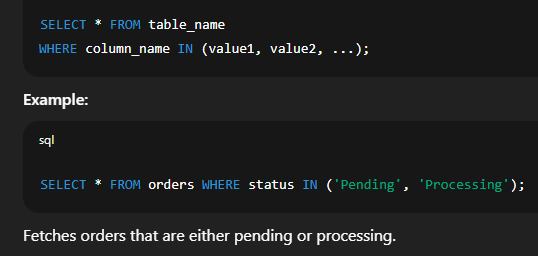
🔹 4. IN
The IN operator checks if a value exists in a list of values.
Syntax:
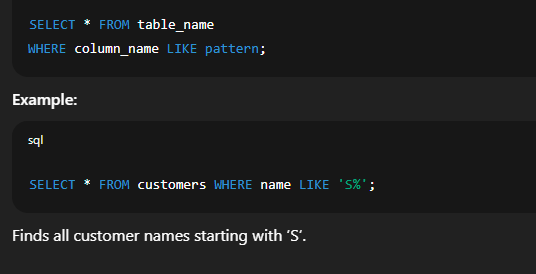
🔹 5. LIKE
Used for pattern matching using wildcards:
%for zero or more characters_for a single character
Syntax:
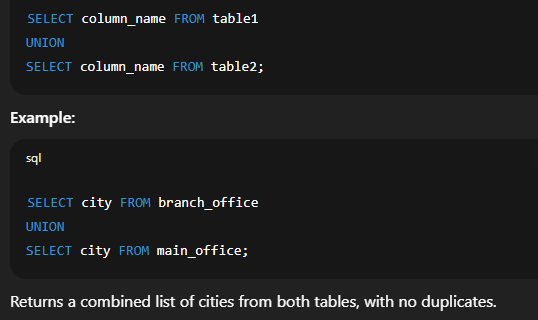
🔹 6. UNION
Combines the results of two or more SELECT statements. It automatically removes duplicate records.
Syntax:
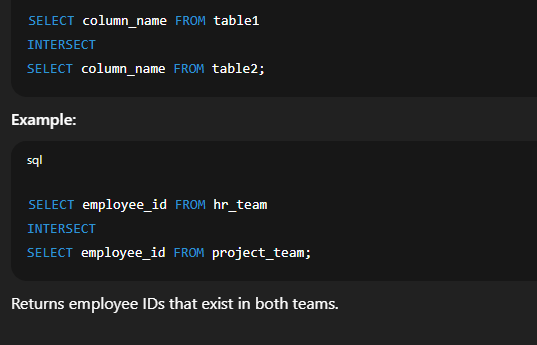
🔹 7. INTERSECT
Returns only the common records from two SELECT queries.
Syntax:
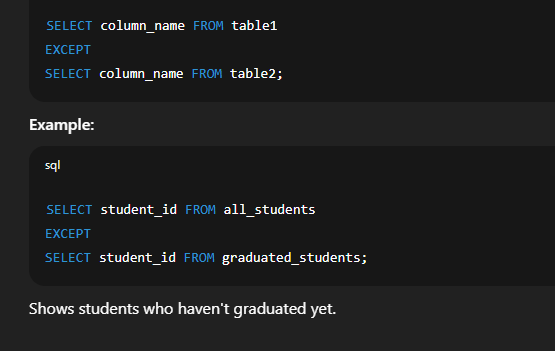
🔹 8. EXCEPT
Returns rows from the first query that are not present in the second query.
Syntax:
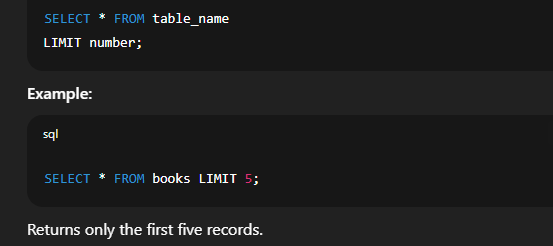
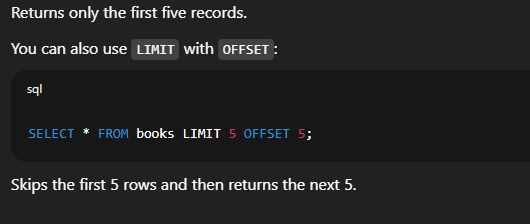
🔹 9. LIMIT
Limits the number of rows returned by a query.
Syntax:
🔹 10. IS NULL / IS NOT NULL
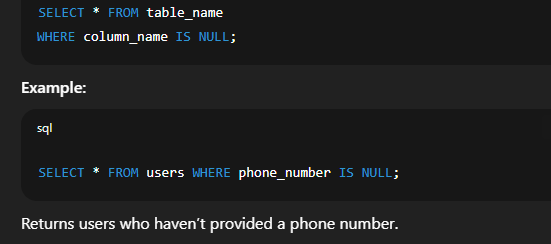
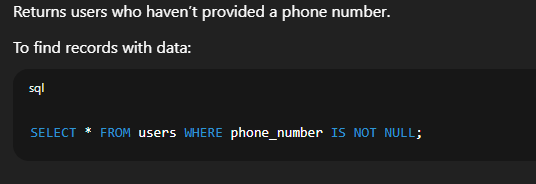
Checks for missing (null) values in a column.
Syntax:
| Clause / Operator | Description |
|---|---|
| DISTINCT | Removes duplicate values |
| WHERE | Filters rows based on condition |
| BETWEEN | Filters within a range |
| IN | Checks for values in a list |
| LIKE | Pattern-based matching |
| UNION | Combines query results (no duplicates) |
| INTERSECT | Returns common results from two queries |
| EXCEPT | Returns results from the first query not in the second |
| LIMIT | Restricts number of rows returned |
| IS NULL | Filters rows with null values |
✅ 1.2.2 GROUP BY, HAVING, ORDER BY & Conditional Logic (CASE) in SQLite
In SQL and SQLite, these clauses are used to organize, filter, and sort data, especially when working with groups, aggregates, or conditional outputs. They are particularly useful in data summarization and reporting tasks.
🔹 1. GROUP BY Clause
The GROUP BY clause is used to group rows that have the same values in specified columns. It’s often used with aggregate functions like COUNT(), SUM(), AVG(), MAX(), or MIN() to generate summary reports.
Syntax:
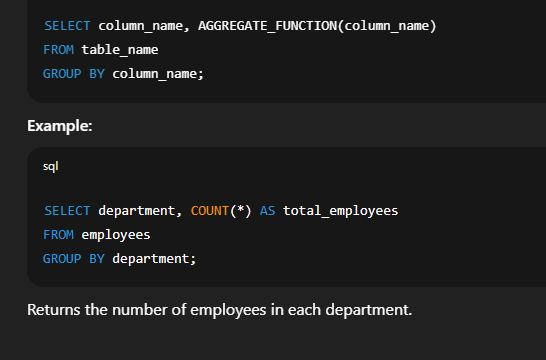
🔹 2. HAVING Clause
The HAVING clause filters the result of groups created by GROUP BY. Unlike the WHERE clause, which filters individual rows, HAVING works on groups.
Syntax:
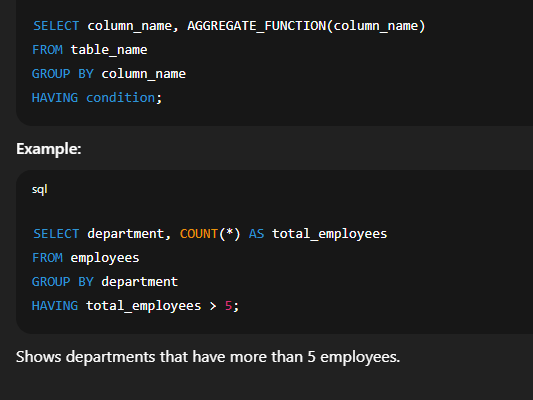
🔹 3. ORDER BY Clause
The ORDER BY clause is used to sort the result set in ascending (ASC) or descending (DESC) order based on one or more columns.
Syntax:
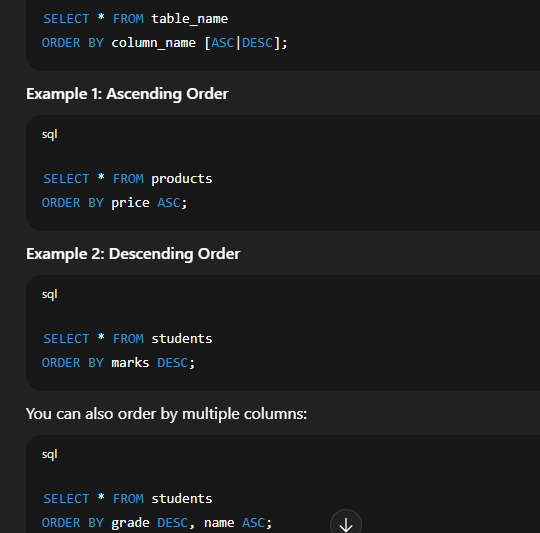
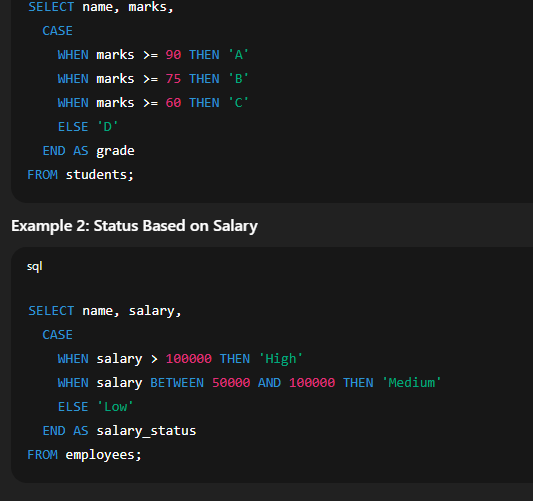
🔹 4. Conditional Logic with CASE
The CASE expression in SQLite allows you to implement conditional logic in SQL queries. It works like an if-else or switch-case structure in programming.
Syntax:
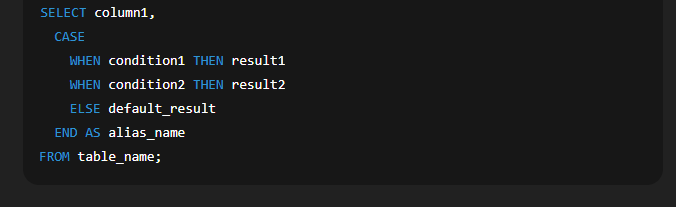
✅ Use of GROUP BY, HAVING, ORDER BY and CASE Together
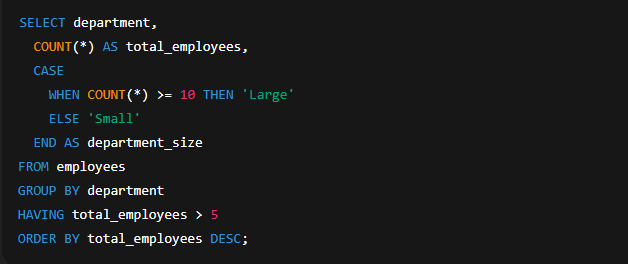
This query:
Groups employees by department,
Counts them,
Applies a CASE condition to label departments,
Filters those with more than 5 employees,
Sorts them in descending order.
✅ 1.3 SQLite Joins: INNER, LEFT, CROSS, SELF, FULL OUTER
In SQLite, a JOIN is used to combine rows from two or more tables based on a related column. It helps in retrieving meaningful information that spans across multiple tables.
🔹 1. INNER JOIN
An INNER JOIN returns only the rows where there is a matching value in both tables.
Syntax:
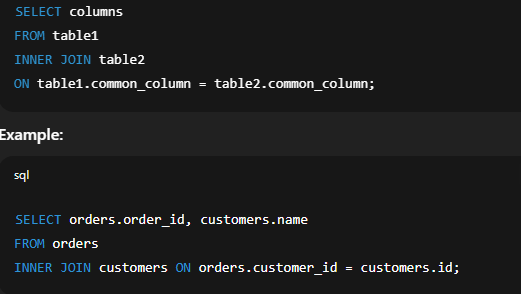
✔️ Only orders with existing customer IDs in the customers table will be shown.
🔹 2. LEFT JOIN (LEFT OUTER JOIN)
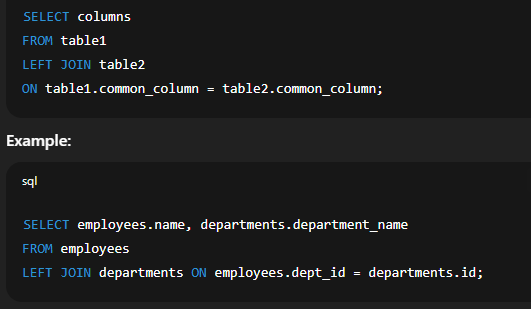
A LEFT JOIN returns all rows from the left table, and the matched rows from the right table. If no match is found, NULL values are returned for columns from the right table.
Syntax:
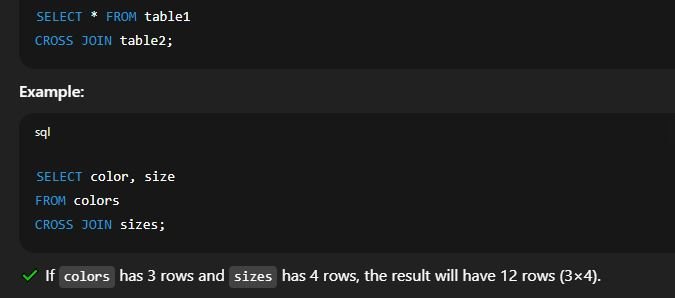
🔹 3. CROSS JOIN
A CROSS JOIN returns the Cartesian product of the two tables, meaning every row from the first table is combined with every row from the second table.
Syntax:
🔹 4. SELF JOIN
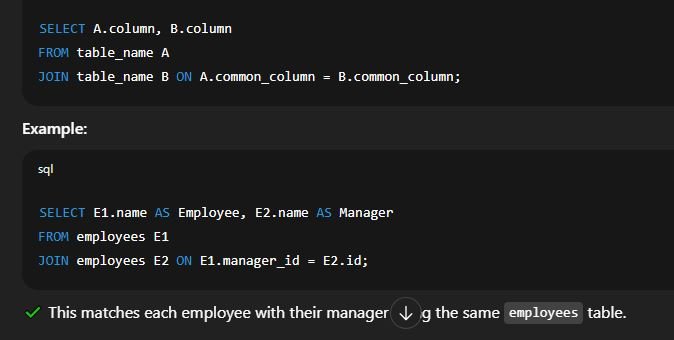
A SELF JOIN is a regular join where a table is joined with itself. It is used to compare rows within the same table.
Syntax:
🔹 5. FULL OUTER JOIN
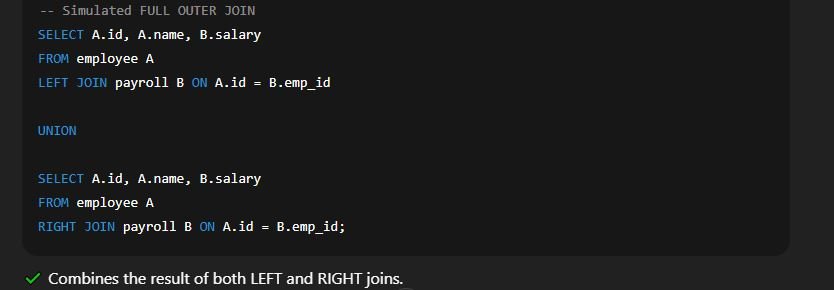
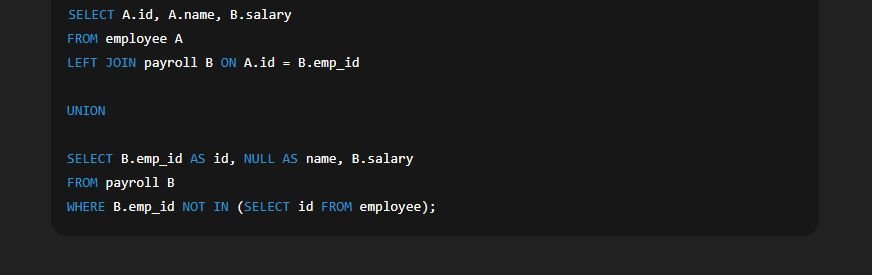
A FULL OUTER JOIN returns all rows from both tables. Where a match exists, it returns the joined row; otherwise, it returns NULLs for missing matches.
🚫 Note: SQLite does not natively support FULL OUTER JOIN, but we can simulate it using UNION.
Workaround Example:
| 🔗 Type of Join | 📌 Returns |
|---|---|
| INNER JOIN | Matching rows in both tables |
| LEFT JOIN | All rows from left table + matched rows from right |
| CROSS JOIN | All possible combinations of rows |
| SELF JOIN | Related rows within the same table |
| FULL OUTER JOIN | All rows from both tables (requires workaround in SQLite) |
🔹 1.4 SQLite Trigger – Detailed Notes
📘 What is a Trigger in SQLite?
A Trigger in SQLite is a special type of database object that automatically executes a specific action in response to a certain event on a particular table. These events include operations such as INSERT, UPDATE, or DELETE.
Triggers help in enforcing business rules, data validation, maintaining logs, or updating related data automatically without manual intervention.
✅ Key Features of SQLite Triggers:
Automatic Execution: Executes automatically when a defined event occurs.
Event-driven: Works on data-changing events like insert, update, delete.
Enhances Data Integrity: Useful for enforcing complex business logic.
Reusability: Once created, a trigger can be reused as long as the condition is met.
Lightweight: Triggers in SQLite are efficient and run fast.
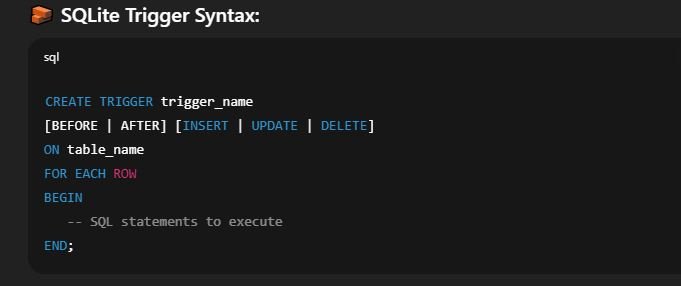
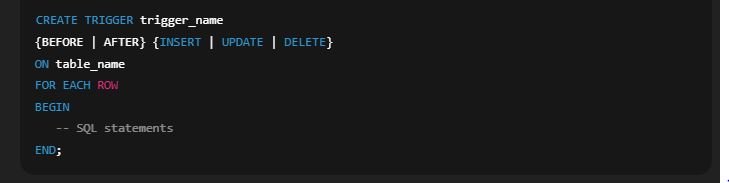
Explanation:
trigger_name: The name you give to the trigger.BEFORE | AFTER: Specifies whether the trigger runs before or after the event.INSERT | UPDATE | DELETE: The type of event that activates the trigger.FOR EACH ROW: Ensures the trigger runs for every row affected.BEGIN ... END;: Contains one or more SQL statements to be executed when the trigger fires.
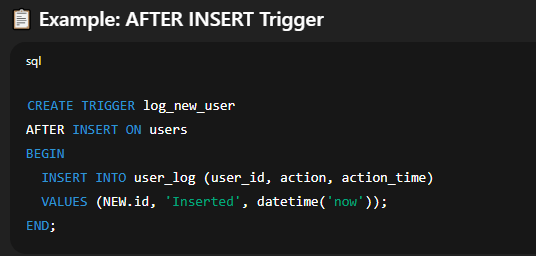
🔍 Example 1: AFTER INSERT Trigger
Suppose we have a table students and we want to maintain a log of every new student added in a student_log table.
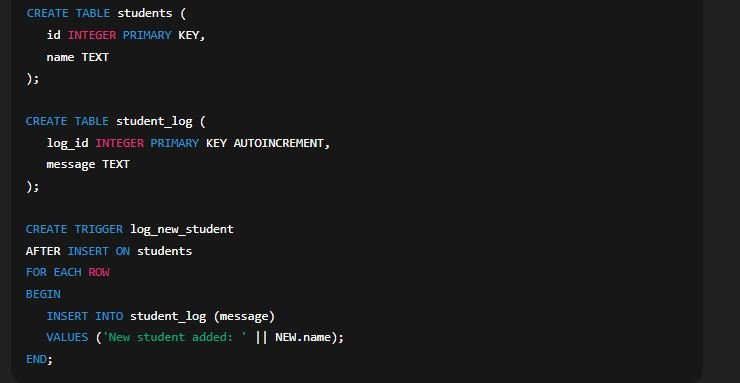
Explanation:
When a new student is added to the students table, this trigger will automatically insert a message into the student_log table.
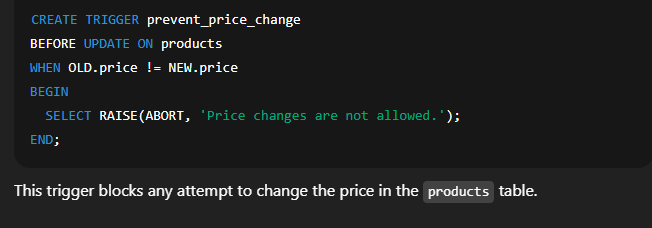
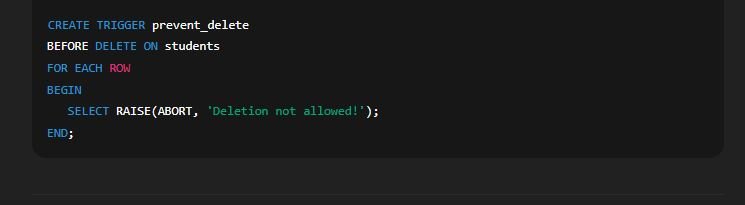
🔁 Example 2: BEFORE DELETE Trigger
Prevent deleting a record from a table unless certain condition is met.
| 🧠 Variable | 📘 Meaning |
|---|---|
NEW.column_name |
Refers to new value in INSERT or UPDATE |
OLD.column_name |
Refers to old value in DELETE or UPDATE |
🛑 Limitations of Triggers in SQLite:
Cannot call external programs or functions.
Not supported on views.
Nested triggers (triggers calling other triggers) are limited.
Triggers can’t modify the table they are attached to directly in the same statement.
🎯 Use Cases of Triggers:
Audit trails or logging changes
Enforcing data consistency between tables
Blocking or validating unwanted changes
Automatically updating related fields
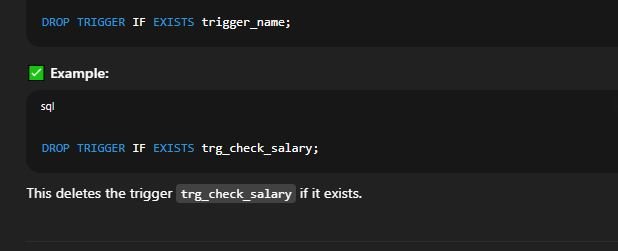
📝 How to Delete a Trigger:

📌 Summary:
SQLite Triggers are powerful tools to automate actions based on table events.
They maintain data consistency and reduce the need for manual intervention.
Useful for enforcing rules, maintaining logs, and auto-updates.
🔹 Concept of Trigger in SQLite
A trigger in SQLite is a predefined SQL statement that automatically executes (or “fires”) in response to certain database events—specifically, when a record is inserted, updated, or deleted from a table.
Triggers are mainly used for:
Enforcing business rules
Maintaining audit trails
Automatically updating fields
Performing validations
Maintaining data consistency across multiple tables
| 🔹 Trigger Type | 📝 Description |
|---|---|
| BEFORE Trigger | Executes before the actual data modification happens |
| AFTER Trigger | Executes after the data has been modified successfully |
You can create triggers for three actions:
INSERT
UPDATE
DELETE
These actions can be combined with BEFORE or AFTER keywords to determine when the trigger runs.
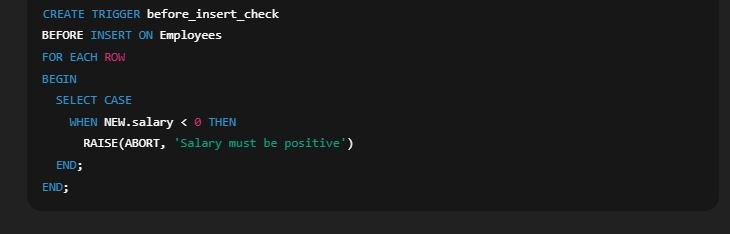
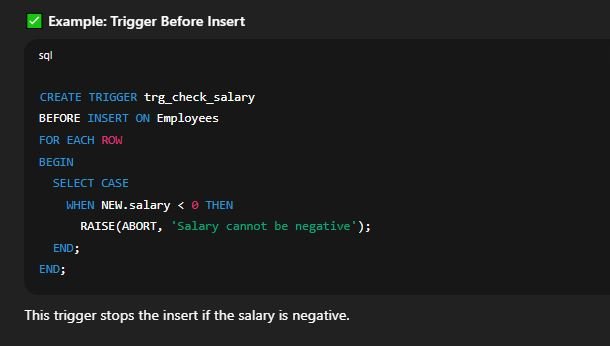
🔹 BEFORE Triggers
A BEFORE trigger allows you to intercept a data modification event and make changes or cancel the operation before it occurs.
Example Use-Case:
Before inserting a row, check if a value meets certain criteria, and cancel the insert if not.
Syntax Example:
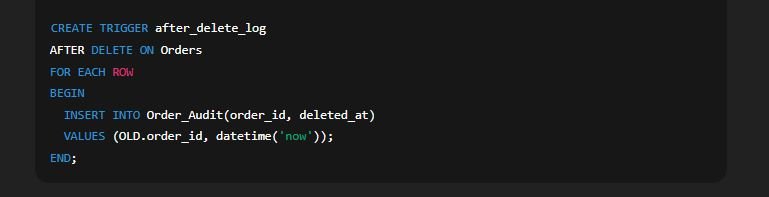
🔹 AFTER Triggers
An AFTER trigger is used when you want an action to occur only after the original operation completes.
Example Use-Case:
Automatically insert a record into an audit table after a delete operation.
Syntax Example:
🔹 Trigger Events Explained
✅ INSERT Trigger:
Runs when a new row is added. You can access:
NEW.column_name: value being inserted
✅ UPDATE Trigger:
Runs when a row is modified. You can access:
OLD.column_name: previous valueNEW.column_name: new value
✅ DELETE Trigger:
Runs when a row is deleted. You can access:
OLD.column_name: the deleted value
| 🔹 Action | ⚙️ BEFORE Trigger Usage | 📌 AFTER Trigger Usage |
|---|---|---|
| INSERT | Validate or modify values before insert | Log or update audit tables |
| UPDATE | Check previous vs new value | Trigger dependent updates |
| 🔹 Command | 🎯 Purpose | ✅ Supported in SQLite |
|---|---|---|
CREATE TRIGGER |
Define a new trigger | ✅ Yes |
DROP TRIGGER |
Delete an existing trigger | ✅ Yes |
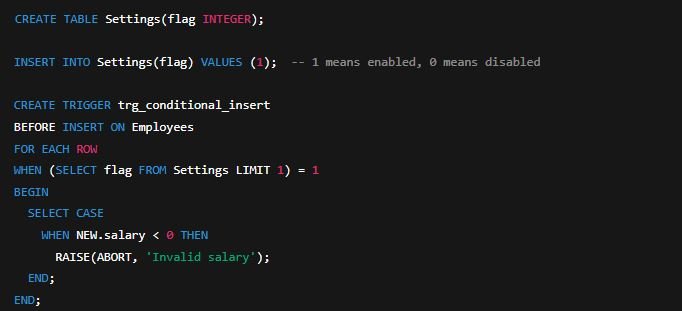
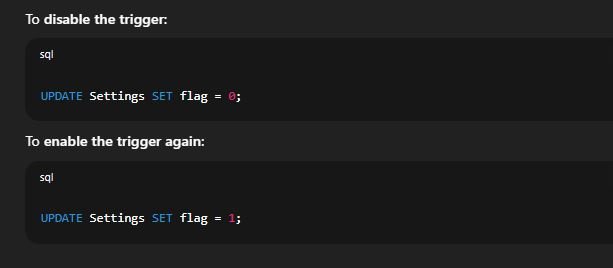
DISABLE TRIGGER |
Temporarily stop trigger from firing |