Unit 2: Advanced PHP and File Management

Advanced PHP and File Management
2.1 File Handling and Directories
2.1.1 Including files using include and require
2.1.2 File operations: fopen(), fread(), fwrite(), fclose()
2.1.3 File upload using $_FILES and move_uploaded_file()
2.1.4 File download using PHP headers
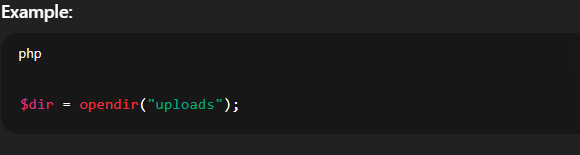
2.1.5 Directory operations: opendir(), readdir(), mkdir(), rmdir()
2.2 Forms, Filters, and JSON
2.2.1 Designing and handling HTML forms
2.2.2 Server-side validation techniques
2.2.3 PHP filters: filter_var() and constants
2.2.4 Parsing and generating JSON with json_encode() and json_decode()
2.3 Cookies, Sessions, and Emails
2.3.1 Creating and accessing cookies using setcookie() and $_COOKIE
2.3.2 Session management with session_start() and $_SESSION
2.3.3 Sending emails using the mail() function
2.3.4 Email formatting: headers, subject, attachments
2.4 OOP and Exception Handling in PHP
2.4.1 Creating classes and objects
2.4.2 Using constructors and property visibility
2.4.3 Inheritance and method overriding
2.4.4 Exception handling: try, catch, finally, throw
2.4.5 Input validation using regular expressions
ASSIGNMENT
2.1 File Handling and Directories in PHP
In PHP, file handling refers to the process of creating, reading, writing, and managing files on the server. It allows developers to store and retrieve data outside of databases, which is useful for tasks like logging user activity, reading configuration files, or exporting reports.
1. Basic File Operations
PHP provides built-in functions to perform operations on files:
fopen()– Opens a file in a specific mode (read, write, append, etc.).fread()/fgets()– Reads content from a file.fwrite()– Writes data to a file.fclose()– Closes an open file to free up resources.file_get_contents()/file_put_contents()– Quick ways to read and write files.
2. File Modes
When opening files, you specify a mode:
'r'– Read-only. File must exist.'w'– Write-only. Overwrites file or creates a new one.'a'– Append. Adds data at the end of the file.'r+','w+','a+'– Read and write versions of the above modes.
3. File Checks and Management
Before working with files, it’s good to check their status using:
file_exists()– Checks if a file exists.is_readable()/is_writable()– Checks file permissions.unlink()– Deletes a file.filesize()– Returns the file size in bytes.
Directories in PHP
PHP also allows manipulation of directories (folders), which helps in organizing files.
1. Creating and Removing Directories
mkdir()– Creates a new directory.rmdir()– Removes an empty directory.
2. Reading Directory Contents
opendir()– Opens a directory for reading.readdir()– Reads files and subfolders inside the directory.closedir()– Closes the directory handle.scandir()– Returns an array of files/folders in a directory.
Why File and Directory Handling Matters
Proper file and directory handling improves:
Data organization
Performance for file-based storage
Security, by managing access rights
Backup and logging systems
2.1.1 Including Files Using include and require in PHP
In PHP, the include and require statements are used to insert the content of one PHP file into another. This helps in writing modular, reusable, and organized code by separating different parts of a program into separate files.
1. include Statement
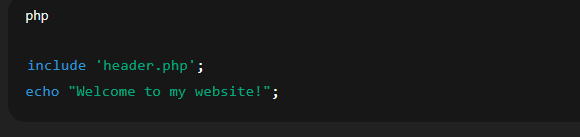
The include statement adds the content of another file, such as a header, footer, or configuration file, into the current script.
Syntax:

If the file is not found, PHP shows a warning, but the script continues to run.
Example:
2. require Statement
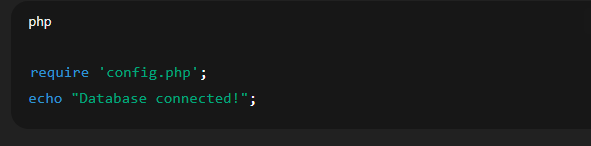
The require statement works similarly to include, but with one key difference.
Syntax:

If the file is missing or not found, PHP will throw a fatal error and stop the script immediately.
Example:
3. Differences Between include and require
| Feature | include |
require |
|---|---|---|
| On Missing File | Shows a warning | Throws a fatal error |
| Script Behavior | Continues execution | Halts execution |
| Use Case | Optional files | Critical files |
4. Using include_once and require_once
To prevent the same file from being included more than once (which can cause errors), PHP also provides:
include_oncerequire_once
These versions ensure that the file is included only once, even if called multiple times.
Why Use File Inclusion?
Keeps code clean and maintainable
Reduces repetition (DRY principle)
Makes large projects easier to manage
2.1.2 File Operations in PHP
PHP provides several built-in functions for handling files. Four commonly used functions are fopen(), fread(), fwrite(), and fclose(). These allow us to open, read, write, and close files efficiently.
1. fopen() – Opening a File
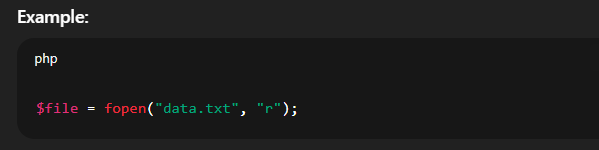
The fopen() function is used to open a file and returns a file handle (a reference to the file) that is used in other file functions.
Syntax:

Modes include:
'r'– Read only'w'– Write only (overwrites)'a'– Append'r+','w+','a+'– Read and write combinations
2. fread() – Reading a File
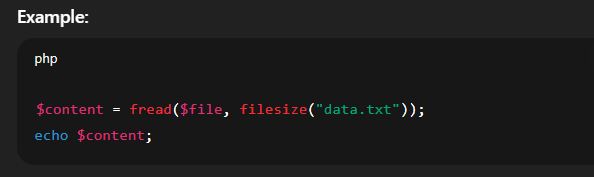
The fread() function reads a specified number of bytes from an open file.
Syntax:

- You usually pass the file handle and the number of bytes to read (often using
filesize()).
3. fwrite() – Writing to a File
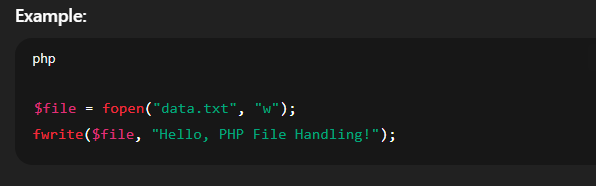
The fwrite() function is used to write data into a file. The file must be opened in write ('w'), append ('a'), or read/write ('r+', 'w+') mode.
Syntax:

4. fclose() – Closing a File
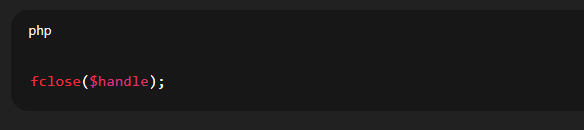
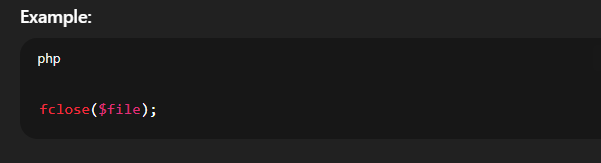
After finishing file operations, it is important to close the file using fclose() to free up system resources.
Syntax:
Why These Functions Matter
These functions are fundamental for:
Creating and editing text files
Logging information
Reading configurations
Exporting data
2.1.3 File Upload Using $_FILES and move_uploaded_file()
In PHP, uploading files (like images or documents) from a user’s browser to the server is commonly done using the $_FILES superglobal and the move_uploaded_file() function. This process is useful in forms where users are asked to submit files.
1. HTML Form for File Upload
To upload a file, an HTML form must have:
method="post"enctype="multipart/form-data"
Example:

2. $_FILES Superglobal
When the form is submitted, the uploaded file’s details are stored in the $_FILES array.
Example:

This array contains:
name– Original file nametype– MIME type (e.g., image/png)tmp_name– Temporary location on the servererror– Error code (0 means no error)size– File size in bytes
3. move_uploaded_file() Function
The uploaded file is stored temporarily. To save it permanently, use the move_uploaded_file() function.
Syntax:

if (move_uploaded_file($_FILES[‘myfile’][‘tmp_name’], “uploads/” . $_FILES[‘myfile’][‘name’])) {
echo “File uploaded successfully!”;
} else {
echo “File upload failed.”;
}
4. Basic File Upload Flow
User selects a file in the browser.
PHP receives the file in
$_FILES.move_uploaded_file()moves it from temporary to permanent location.
Why It’s Important
Enables image uploads in blogs, profiles, etc.
Makes applications interactive and user-driven.
Provides better data handling and flexibility.
2.1.4 File Download Using PHP Headers
In PHP, you can allow users to download files from the server using HTTP headers. This method forces the browser to treat a file as a downloadable item instead of displaying it (especially for images, PDFs, or text files).
1. Why Use PHP for File Downloads?
To control who can access and download files.
To add security checks before download.
To customize file names or types sent to the user.
2. Basic Steps to Download a File
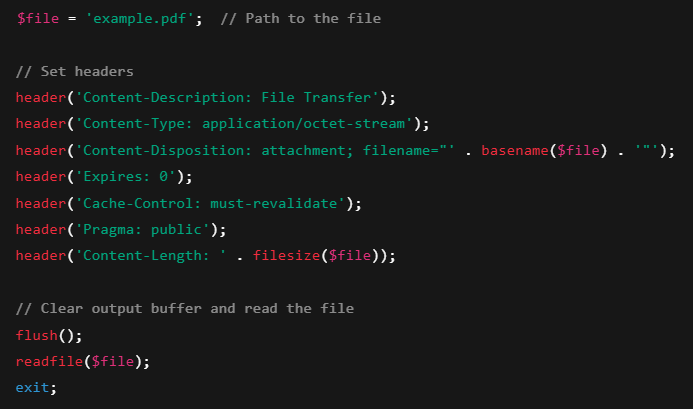
To trigger a download, PHP sends special header information to the browser, followed by the file content.
3. Example: Force Download Using PHP
4. Key Headers Explained
| Header | Purpose |
|---|---|
Content-Type |
Forces browser to treat as binary data |
Content-Disposition |
Marks the file as an attachment to download |
Content-Length |
Tells the browser the file size |
readfile() |
Sends the actual file content |
5. Important Notes
Ensure the file exists before calling
readfile().Use exit after the download to prevent further output.
Check permissions so PHP can access the file.
Common Use Cases
Downloading invoices, reports, or user-uploaded files.
Providing downloadable documents or e-books.
Exporting data (CSV, PDF, etc.).
2.1.5 Directory Operations in PHP
In PHP, directory operations allow you to create, read, and manage folders on the server. These operations are useful for organizing files, managing uploads, or building file-based applications.
1. mkdir() – Create a Directory
The mkdir() function is used to create a new folder.
Syntax:

You can also set permissions (e.g.,
mkdir("uploads", 0755)).
Example:

2. rmdir() – Remove a Directory
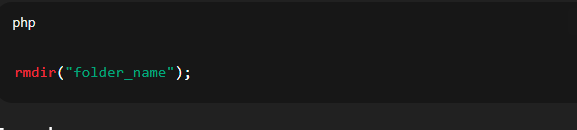
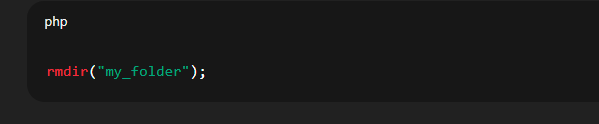
The rmdir() function is used to delete a directory. The directory must be empty before it can be removed.
Syntax:
Example:
3. opendir() – Open a Directory
The opendir() function opens a directory and returns a handle to read its contents.
Syntax: